


Google Analytics 4 has been criticized by marketers since it was released in late 2020.
The list of complaints is long: from the move from user tracking to event tracking, to missing standard reports and replacing bounce rate with engagement rate, to name just a few.
GA4 is the predominant platform for measuring website performance and user behavior. (That’s partly because it’s free, and many competitors disappeared over the years because they couldn’t give away their software for free.)
While some will argue that GA4 falls short in many areas, I believe that many of these perceived flaws are in fact true improvements to the product.
This article explores five main criticisms of GA4 and sheds light on how they actually contribute to its improvement.
1. Data discrepancies and interruptions
One of the main concerns about GA4 is the potential for data discrepancies and outages. This also happened in 2012 when users were forced to switch from the original Google Analytics (GA2) to Universal Analytics (GA3, also known as UA).
With each iteration, the method used by any analytics tool to calculate unique users and sessions changes. This is to more accurately measure these critical data points used in virtually all key performance indicators (KPIs).
Critics argue that the new data model and measurement protocol lead to inconsistencies, making it difficult to rely on GA4 for accurate reporting. This is a flaw in their logic.
Not understanding the differences, they assume it’s inaccurate, when in reality it’s more accurate than UA.
This is why analytics professionals (like myself) have been advocating that companies enable GA4 for over a year now. This ensures you have a full year of data to make meaningful comparisons (comparing GA4 and UA with more than one year of data).
For various reasons, many organizations waited or didn’t bother to review their settings until the last minute to ensure proper data collection. Now they face a big challenge when it comes to comparative analysis of periods.
Users should take this opportunity to review theirs measurement plans and take a more comprehensive and holistic approach to data analysis. With GA4, organizations can leverage multiple data sources (via third-party data imports) and integrate them to gain a deeper understanding of their users and their journey, which was nearly impossible with UA.
2. Learning curve and complexity of the interface
GA4 introduces a revamped user interface and a different approach to reporting, leading to a steep learning curve for many users.
Any change in a UI is difficult. GA4’s user interface has been completely overhauled with no similarities to its predecessor. Critics argue that the complexity of the new interface hinders its adoption and usability.
This should not come as a surprise to any user. Most software updates to new versions include a new user interface. With any new user interface, there is always a learning curve.
The redesigned interface reflects a shift towards a more user-centric approach. It allows all users (marketers and analysts) to explore data in a more intuitive and customizable way, enabling deeper analysis and uncovering hidden patterns.
The new customizable interface lets you make the GA4 interface truly your own. Remove reports that don’t apply to your business. Add custom reports that fit your organization. Organize and group reports into meaningful categories. (You don’t need to know how Google thinks the reports should be named or grouped!)
While the initial learning curve can be daunting, the long-term benefits of improved data interpretation and useful information and a fully customizable interface far outweigh this temporary drawback.
3. Limited historical data
Another criticism of GA4 is its limited compatibility with historical AU data. Users argue that this limitation hinders the ability to perform meaningful trend analysis and accurately track long-term performance.
This is not new.
The same attitude was taken when GA migrated to UA. In 2012, there was also no option to bring old data into the new UA measurement logic. This led companies to compare apples to oranges (before and after the change) in their data.
Many analytics professionals have long advocated and argued that there was little analytic information to be gained from reviewing data older than one year, and certainly two years. The impact of the pandemic on many companies makes comparing year-on-year data meaningless, and so does comparing recent months with the same period three or four years earlier.
Websites and apps have been updated, marketing strategies have been modernized, and the global economy and user preferences have changed. Unless your reporting takes this into account, simply reporting users, sessions and even sales out of context didn’t make sense and still does.
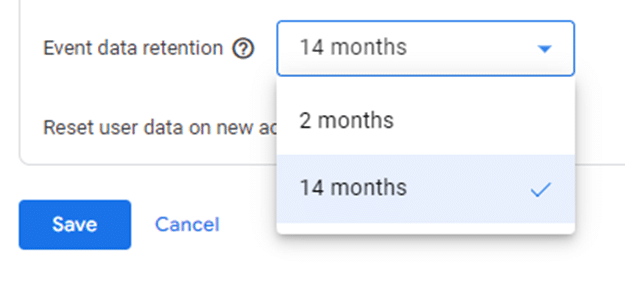
GA’s new maximum data storage limit of 14 months is puzzling compared to the previous “unlimited” option. To solve this problem, Google has given all accounts a free BigQuery (data warehouse) account. If you store your data here, you still get a virtually unlimited storage period.
Of course, setting up and using BigQuery is not simple. It involves a steep learning curve and a time commitment that overwhelms many Google Analytics users, especially those who don’t have their own data team.
With limited historical data, you need to reevaluate your measurement approach. How will you measure success? Adopting GA4 allows us to review our data collection strategies and redefine KPIs.
This shift calls for a new perspective on data analytics, focusing on future and real-time insights rather than relying solely on historical trends. Consequently, we can better align strategies with current market dynamics and quickly adapt to changing consumer behavior.
While digital analytics helps evaluate marketing performance, it’s far more effective at generating questions than answering them. Reviewing your analytics for changes in user behavior, and then investigating why, provides more value than simply using them to validate campaign effectiveness.
4. Reduced customization options
GA4 offers a more streamlined approach to event tracking and customization compared to its predecessor.
Critics claim that this reduction in customization options (custom reports only) limits the ability to track specific user actions and tailor analytics to individual business needs. However, this apparent flaw marks the beginning of a new era of efficiency.
GA4 enables marketers and analysts to focus on the most critical metrics and results by simplifying event tracking. It forces us to reevaluate our monitoring requirements and prioritize the metrics that really matter, resulting in a more concise and actionable view.
Reduced customization options promote a more standardized approach to analysis, facilitating industry-wide benchmarking and comparisons.

Despite critics’ claims of a reduction in customization, GA4 offers greater levels of customization in the user interface.
You can (using the library feature) completely customize the user interface and add any number of custom reports and report sections.
With a little effort, the entire user interface can be customized to your business needs.

By doing so, regular reports are easily accessible.
Reports that have never been used can be removed from the user interface.
The result is faster access to data that results in greater productivity.
5. Privacy issues and consent management
With the growing emphasis on user privacy, GA4’s stricter data collection and consent management mechanisms have drawn criticism. Critics argue that enhanced privacy measures limit the availability of data for analysis and hinder marketers’ ability to fully understand their audience.
However, this perceived flaw is crucial to building trust and transparency. By adopting privacy-focused practices, companies can strengthen their relationships with users and establish themselves as ethical data stewards.
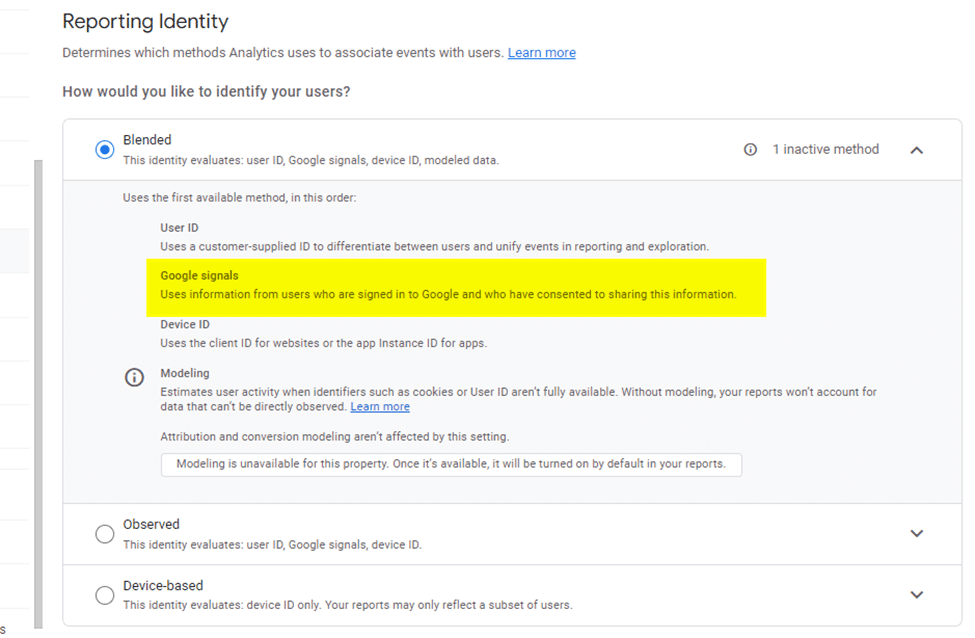
As part of the migration to GA4, website and app privacy policies should be reviewed. This review is critical for sites that have enabled Google signals as part of their “Reporting Identity” and operate under the legal aspects of GDRP.
Embrace changes in your measurement approach
Once you get over the initial shock of the new interface and understand why the top five complaints about it are actually positive improvements, you’ll probably start to appreciate GA4.
Although there are elements missing from the standard features, there is hope that Google will add them back in a future release. (The annotation tool and the ability to save predefined segments of standard reports are lost to users.)
While the release of the GA4 update is widely regarded by many vendors as “one of the worst ever,” it brings improvements that will likely be adopted by most users in a few months.
The views expressed in this article are those of the guest author and not necessarily Search Engine Land. Staff authors are listed here.
[ad_2]
Source link





