


PPC advertising can be a game changer for small businesses looking to drive sales or increase brand awareness. Unfortunately, it’s also very easy to overspend if you’re not careful.
When your budget is tight, it’s crucial that you set yourself up for success when setting up a PPC account.
Just a couple of bad months of PPC spend can be the difference between growing or closing your doors forever.
So, before you start pouring money into Google Ads or Microsoft Advertising, read these five essential tips for doing PPC bidding on a budget.
1. Set clear goals and base the account around them
One of the best things about PPC advertising is that there are ways to achieve any business’s goals.
You can choose from many different campaign types and bid options, and there are numerous Google platforms where you can advertise.
When you’re limited by your budget, it’s critical that you figure out what your primary goal is and create campaigns that help you achieve it.
Do you want to increase your brand awareness? Display and YouTube are good options to do this.
Maybe you’re an e-commerce business looking to drive more purchases and revenue. Next, consider search and shopping campaigns.
These campaigns work best when they work together and drive a complete funnel strategy. But when the budget is tight, it’s time to eliminate secondary strategies and focus on results.
2. Make your campaigns simple and specific
When creating your PPC campaigns, it’s important to be specific.
You want your ads to be as relevant to users’ search queries as possible.
It’s important to structure your campaigns and ad groups so that your ads match the keywords you’ve chosen.
Let’s use a clothing company as an example. They sell all kinds of clothing, but want to focus on t-shirts and denim pants.
I want my ads to be as relevant to the user’s search as possible, so I create campaigns and ad groups based on clothing type:
Campaign: T-Shirt Ad Group: T-Shirt Ad Group: Women’s T-Shirt Ad Group: Men’s T-Shirt Ad Group: Kids’ T-Shirt Ad Group Campaign: Ad Group of denim pants: Denim pants ad group: Women’s denim pants ad group: Men’s denim pants ad group: Children’s denim pants
Setting up your campaigns this way accomplishes two things:
The first is that it is incredibly simple and easy to understand. If I look at the performance data for all of these ad groups, I can very easily say:
What types of products work well (t-shirts or denim pants). Which demographic is most popular with our product (women, men, children, etc.).
This makes optimization much easier than if all of these products were lumped into one or two ad groups.
The second is that each ad group listed above will have keywords and ads specific to its category.
So if someone searches for “kids t-shirts”, the ad they’ll be shown will be about kids’ t-shirts and will direct them to a landing page with kids’ t-shirts.
If we only had one ad group for t-shirts, our ads would have to be much more generic and less likely to lead to a purchase.
Get the daily search newsletter marketers trust.
3. Use long tail keywords
PPC advertising is an auction-based platform, where advertisers bid to display their ads in searches for specified keywords and the ad space goes to the highest bidder.
Just like real-life auctions, winning is much easier when you have a lot of money. Imagine!
So if you have less money than other people in the auction, how do you win? Simple, you look for the prizes for which there are fewer people bidding.
In paid search, we call these long-tail keywords: keywords that have more qualifying words and lower search volume. Let’s see an example:
Close your eyes and imagine that you own a company that specializes in creating custom stickers. Okay, open your eyes so you can continue reading, but don’t stop imagining.
You want to generate more sales through paid advertising, but you only have $1,500 per month to spend.
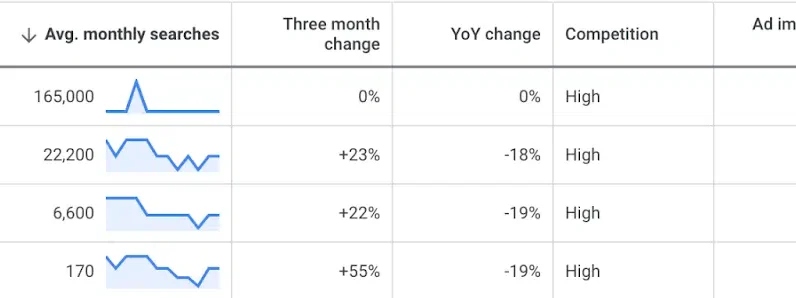
Do some keyword research with Google Keyword Planner and here’s what you find:
The first thing you think is “let’s see how many people search for stickers every month”.
And wow, 165,000 is a lot of people!
But to appear at the top of the page for this search, you may have to pay up to $8.29 per click. With a budget of $1,500, that’s just 180 clicks to try and get your brand out there.
If you choose to be more specific with your keyword choices and focus on bumper stickers, your average monthly search volume drops significantly, but so does your estimated cost per bid.
At a cost per click of $4.49, you can generate 334 clicks with your budget. That’s almost twice as many clicks just for being a little more specific with your keywords.
Taking it a step further with “custom bumper stickers” and “design your own bumper stickers” will further reduce monthly searches, but their intent is much more specific.
If someone searches for “bumper stickers”, it could mean that they want to create a custom bumper sticker.
But they could also be looking to buy a specific bumper or they could be researching the origin of bumper stickers.
On the other hand, the intent of “design your own bumper stickers” couldn’t be clearer.
Bidding on long-tail keywords saves you money and increases your chances of conversion.
4. Limit targeting by location
Location targeting is an easy to overlook but important factor when trying to succeed on a budget, especially if you’re an online business.
If you have the ability to serve customers from the United States or another country, you may be tempted to do so.
However, unless your business is in a niche market, your budget may not be large enough to serve the entire country.
Instead, you’ll be better served allocating that budget to your best-performing markets.
Let’s review my sticker company from before. For the sake of the example, let’s imagine that this company is based in Seattle and ships all over the US
The volume of searches for stickers-related keywords is too much to cover my $1,500 per month, so I want to be more strategic about where I show my ads.
Just considering the shipping costs, I find it much cheaper to ship my products to the West Coast than to ship to the East Coast.
As a Washington-based company, I also have more brand awareness in my area and customers are more likely to know and do business with me than someone based in Florida.
So, to save myself some money and increase my chances of conversions, I’m going to set my campaigns to show to customers in the US West.
5. Don’t set it and forget it
Over the years, Google has made it exponentially easier to set up a campaign with automatic bidding and automatic application recommendations.
Advertisers can have decent success without having to work harder – that’s a good thing!
Using Google Ads shouldn’t be so confusing and complicated that you need to be a marketing professional to manage it.
However, you’re leaving money on the table if you set up your campaigns and let them run without ongoing management.
Once your campaigns start running and collecting data, you should, at a minimum, check:
How much your campaigns are spending compared to your monthly budget. Which keywords are performing well and which are not.
Removing non-performing keywords is an incredibly simple way to continuously improve performance over time.
Small budget, big results
PPC advertising can be a valuable tool for small businesses with limited budgets, but it requires careful planning and execution to avoid overspending.
By implementing these tips, small businesses can maximize their chances of success while ensuring that their budget is used wisely.
With ongoing management, PPC can be a game-changing tool to drive growth and achieve your business goals.
The views expressed in this article are those of the guest author and not necessarily Search Engine Land. Staff authors are listed here.
[ad_2]
Source link





