


Understanding how users interact with a website is essential to any business, especially when evaluating the effectiveness of advertising efforts.
To help advertisers with this, Microsoft introduced new insights for Universal Event Tracking (UET) tags designed to meet these business requirements more effectively and increase website traffic and conversions.
This feature, scheduled for continued activation starting July 3, will be automatically enabled for existing UET tags.
In particular, UET Insights incorporates enhanced data collection methods intended to provide valuable information to users and improve the accuracy of ad targeting.
What is a Microsoft UET tag?
A Microsoft Advertising UET tag tracks the activities of customers on your website after they click on your ad. Include a single UET tag on your website, allowing Microsoft Advertising to collect relevant data.
This data collection allows you to monitor conversion goals and create specific remarketing lists to target audiences more effectively.
UET allows you to track various conversion goals, such as purchases, signups, downloads, and more. Conversion goals can be set based on the following criteria:
The number of visitors who visited a particular page or section of your website. The instances where visitors have spent a specific amount of time on your website. Cases where visitors have browsed more than a certain number of pages on your website. The count of people who have clicked and installed your mobile app.
Along with these, several others personalized goals and events can be configured and tracked.
What the new UET knowledge offers
The new insights introduced include several advances, with the aim of providing a deeper understanding of website user interactions.
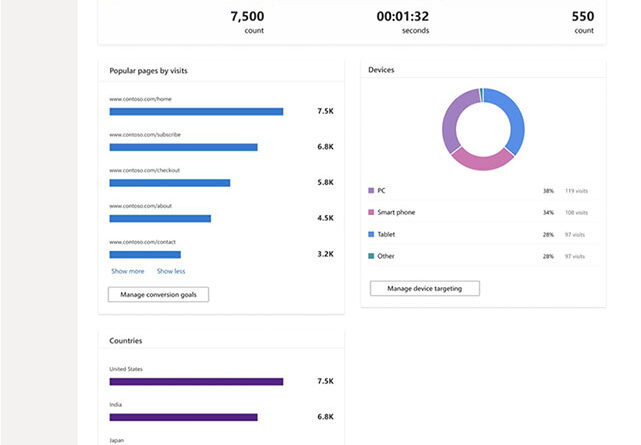
UET Insights includes a powerful built-in dashboard for website data, which streamlines understanding of user engagement. This feature allows businesses to fine-tune their web pages and optimize targeting for improved conversions.
Screenshot from Microsoft, May 2023
The dashboard displays crucial data, such as:
The overall visits to your website and the number of visits each page has received. A breakdown of sessions by country of origin and device type. Bounce data, which refers to customers who spend just a few seconds on your website. Information about how long visitors spend on your website.
These statistics include additional metrics such as page latencies, which include speed and load times, interactions such as clicks and scrolls, specifics of shopping carts, details related to cart abandonment, browser-related signals and JavaScript browser errors.
How UET Insights helps advertisers
The benefits of UET Insights should go beyond providing a comprehensive understanding of your website’s performance.
They should help advertisers improve ad effectiveness through improved targeting, fraud detection, and minimizing lost conversions.
All these factors contribute to a better understanding of user behavior and website performance, leading to more efficient advertising strategies.
What advertisers need to know
Activating UET Insights does not require coding. Existing tags will be automatically updated in the backend, while new tags created in the future will be pre-equipped with UET Insights.
Here are some other essential aspects to consider:
UET Insights is designed in a way that ensures there is no adverse effect on your site’s performance. The collected data is processed and presented almost instantly on the UET dashboard. There is no data sampling, which ensures that the information you receive is complete and representative. Advertisers retain full control over UET Insights and can choose to opt out if necessary.
For a deeper understanding of this feature, it is recommended to refer to the help page provided by Microsoft.
If advertisers want to opt out of UET Insights for any reason, they have a couple of options.
Before June 28th, advertisers can opt out of automatic renewal by completing the opt-out form. They will need to provide the IDs of the specific UET tags they want to exclude, or the ID of the manager account if they plan to disable all UET tags associated with that manager account.
If advertisers decide to opt out after enabling UET Insights, they can do so conveniently through the UET dashboard at Microsoft Advertising Platform.
Featured Image: sdx15/Shutterstock
[ad_2]
Source link





