


Last month, WordPress released a way to create or test WordPress sites on the desktop, but the app was limited to Apple Mac devices. This month WordPress announces that WordPress Studio is now available for Microsoft Windows.
According to WordPress, Microsoft Windows users account for more than 25% of WordPress developers. But non-developers who use WordPress for their websites may have many more people who use WordPress and want to learn how to build on it.
WordPress Studio is an easy-to-use development platform that will help developers using Microsoft Windows as well as non-developers who want to learn how to use WordPress without messing up a live website.
The official WordPress announcement explained:
“We recently launched Studio, our free and open source local WordPress development environment, for MacOS, and we’re excited to share that the Windows version of Studio is now available!
As a reminder, we’ve built Studio to be the fastest and easiest way to build WordPress sites locally.”
Local WordPress development
Local development is a way of working on a website from your (local) desktop instead of working on site at a web host. There are many reasons to work on a website locally, with convenience at the top of the list. Working on a website directly in a desktop environment makes it unlikely that an error could cause the site to be published and cause unintended ranking consequences for the actual site that is live on the web, which is a second reason why local development is popular.
A third reason for local development is that it’s cheaper, faster, and for those with less development skills, generally easier than creating an online test site for the purpose of testing new plugins to verify that they won’t break a site or simply to create a site. demo site to share with a client or team.
So far, the downside of local development is that many of the most popular local development platforms have a steep learning curve that is inconvenient for publishers and SMBs who don’t have the time to dedicate to learning another skill. I know the learning curve because I’ve used some local development platforms in the past.
WordPress Studio
WordPress has now released a solution to the local WordPress development problem that is specific to WordPress and makes it easier for WordPress users to test, develop and learn how to get more comfortable with WordPress. It’s easy to break a WordPress site, and until now there’s never been an easy way to try out WordPress plugins without paying extra or simply learn how to use WordPress.
WordPress lists the following benefits:
Demonstration sites
Forget about Ngrok-like tunnels – share interactive snapshots of your local sites with clients or colleagues, powered by WordPress.com.
Super fast WordPress installation
No matter how many sites you work on, you can create unlimited local sites in Studio.
Independent building
Build lightweight and reliable local WordPress sites, powered by WordPress Playground, without the hassle of Docker, NGINX, Apache or MySQL.
One-click admin
Spend less time wrangling passwords: Open WP Admin for each site with just one click.
Open your site anywhere
Develop your sites your way. Open your site code in your favorite IDE, CLI, or file browser to fit your workflow.
Built by the most important contributor to the core of WordPress
With 109 active contributors, we know WordPress inside and out.
Create and share a demo site
One of the great features of WordPress Studio is the ability to share your demo sites with other people on your team or with clients, to get feedback and iteratively improve the website. A user must first create a WordPress.com account and connect the local Studio desktop application to the WordPress account. Users can host five demo sites for free on a temporary domain (WP.build). Free demo sites last 7 days after the last update of the demo site, so if you need it to stay longer, just update the demo site.
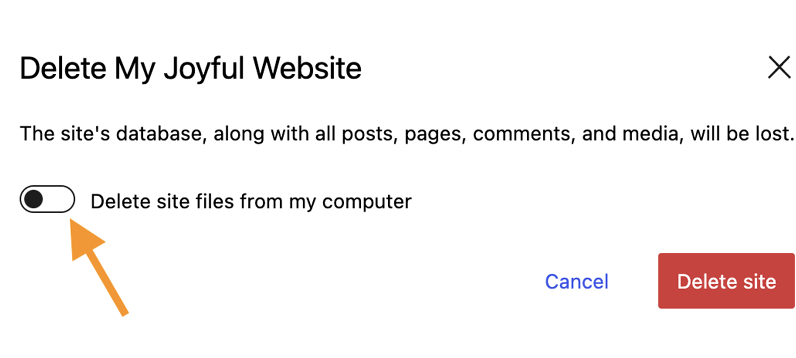
All demo sites can be manually deleted from the hosted demo and also from the desktop.
Screenshot of how to delete a website in Studio
Support for exporting a theme
The WordPress Studio local development environment has the functionality to export a theme. Users can create a theme in their desktop environment and then select to export the theme. The Studio app will export the theme as a zip file that can then be uploaded to a live site (or staging environment) online.
Complete instructions on how to use Studio is available on WordPress.com. Judging by the instructions, using Studio seems to be much easier to use compared to other local development solutions which are generally made to suit a wide range of websites, not just WordPress . The learning curve seems to be relatively smooth compared to other local development environments.
Learn more about the Windows version of WordPress Studio:
Studio: Now available for Windows
Download a version of Studio for Windows or Mac, both versions are free:
Build fast, ship faster with Studio
[ad_2]
Source link





