


John Mueller from Google answered a question about a WordPress site that was completely de-indexed from Google Search after switching to a different web hosting platform. Mueller’s response shows where to start looking into why this is happening.
Removed from index after site migration
A question submitted to the Google Office Hours podcast related that his site disappeared from the search engine results pages after he migrated his WordPress site to “self-publish” and that the site was subsequently de-indexed.
The question may mean that they were hosting the site on the WordPress platform managed by WordPress.com and then migrated their site to another web host, which is usually known as self-hosting.
Migrating a WordPress site to another web host requires a few relatively simple steps, but it can go wrong at virtually every step of the process.
More on migrating a WordPress site later because it’s relevant to the question.
John Mueller answers the question
Mueller answered the question from the point of view of analyzing the web itself, which is the best place to start in this particular case. The reason is because the question implies that the site can still be accessed online.
This is the question:
“After the site was transferred from WordPress to self-publishing, almost all posts disappeared from the index. Search results are “0”.
John Mueller replied:
“If your website dropped out of search results and is no longer indexed at all, right around the time you migrated, then I’m guessing that your new website is blocking the search engines in some way search, or at least blocking Google. I would start by analyzing the data in Search Console and work from there.”
The search console can show the exact date that pages started being dropped from Google’s index and the reason why they are being dropped. Common reasons could be pages not found (404) or a robots.txt has blocked Google from crawling. Here are the starting points for identifying what is happening on Google’s part.
Diagnose if WordPress is blocking Google
This type of problem usually happens when a WordPress site is set to hide from search engines, meaning there is a robots.txt entry that blocks search engines from indexing the site.
Google Search Console will tell you when this happens through the page indexing report which will show that the site is blocked by a robots.txt in the column of the report called “Why pages are not indexed”.
If this is the case, you can see this is the case in the robots.txt file which is usually located at the root of your domain, /robots.txt (example.com/robots.txt).
If Robots.txt blocks the page, a WordPress setting may have been applied at some point during the migration to block search indexing.
This is a native WordPress admin panel setting that can be accessed here:
Configuration 🡪 Reading.
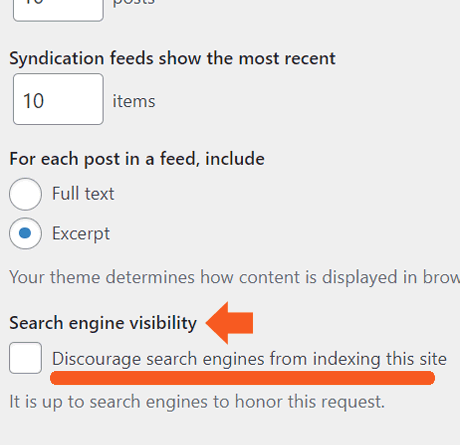
There you will find a setting called “Search Engine Visibility” with a checkbox called Discourage search engines from indexing this site.
Screenshot of WordPress visibility settings
WordPress Search Visibility Settings
If that’s the case, uncheck that box and you’re done.
If there is a robots.txt entry that blocks search engines, but the box above is not checked, it could be another plugin that does, such as an SEO or migration plugin. If not, maybe whoever was helping to make the move inserted this entry, in which case it’s easy to download the robots.txt file, edit the file in a text file editor, and upload it again.
Other issues could be a failure to update your DNS settings to point to the new web hosting service or it could be something on the web host side. Starting your research in Google Search Console is a good tip.
Listen to Google’s response here at minute 7:24:
Featured image by Shutterstock/Roman Samborskyi
[ad_2]
Source link





