


Instagram released a series of tips and tricks to help creators improve engagement with their Stories.
The latest Instagram guide doesn’t introduce any new features, but it does offer presentation tips, along with a couple of sharing tips for creating more impactful stories.
Why we care When you get more people to engage with your stories, you increase your chances of converting viewers into leads. This can lead to more sales and help you grow your following.
1. Add Yours stickers and templates
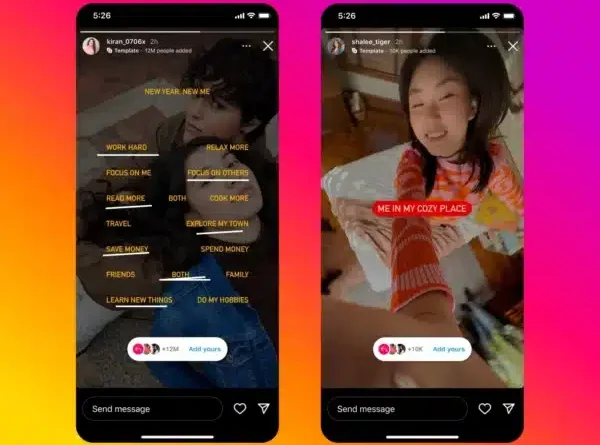
Using personalized messages and public responses on social media provides an interactive way to connect with others. With the Add Your Sticker, you can invite others to contribute to your stories and see their responses. When you see the message “Add yours” to someone else’s story, just tap the sticker to easily add your own story to replies.
Plus, the Add Your Own templates bring more creativity to the table. They allow you to include GIFs, text or images in your story, providing a structured framework for responses. This feature not only increases the visual appeal of your content, but also encourages others to join the conversation in a clear and organized way.
2. Mention someone after posting a story
You can still mention friends even after you publish your story, allowing them to share it with their own story. Just tap the three dots, select “More,” then choose “Add Mention.”
3. Make a collage with Layout
You can include multiple photos in a single story and assemble them into a collage using Layout. To do this, before taking a photo, just tap Design

icon You can tap “Change Grid” to change the layout of your photos. You can then take a series of photos with your camera or select images from your camera roll.
4. Fill the background with a solid color
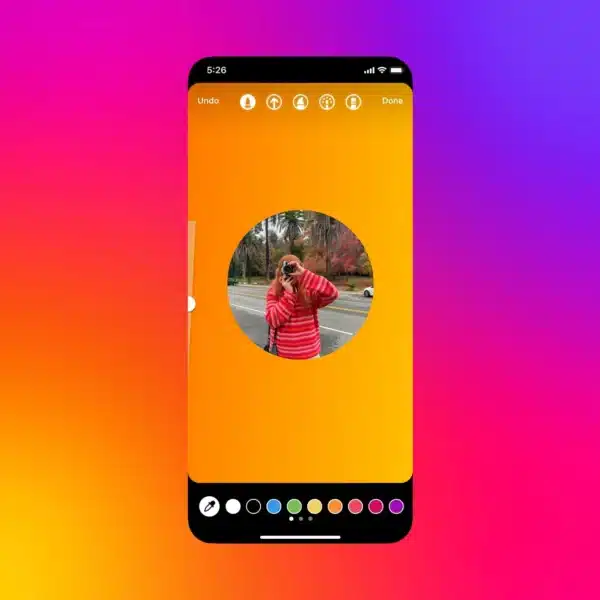
Instagram also suggests filling the background of your story with a solid color to make it more eye-catching. You can use the pencil tool to do this, simply:
Take a photo. Tap “Draw”. Select a color. Hold the screen to fill.
You can enhance your story by adding a translucent overlay using the same process. Simply choose the bookmark icon before tapping the screen to fill it. To select a color, press and hold the color options to access a gradient view for more options.
5. Turn live photos into a boomerang
You can easily transform Live Photos into boomerangs for your story with a single tap. Start by selecting a live photo from your camera roll – these will include the boomerang icon in the corner. Then hold the photo to instantly turn it into a boomerang.
6. Make emojis shine
Instagram also suggests adding a glow effect to the emojis in your story to make them stand out. To do so, follow these simple steps:
Use the text tool to type the emoji you want. Select the neon cursive font. Enable the background text color option. Your emoji will now have a soft glow around it. You can also customize the color of the glow using the color picker.
Get the daily search newsletter marketers trust.
deep dive Read the ones on Instagram blog entry in full for more information.
[ad_2]
Source link





