


A few months ago, I wrote an article on how to get your website to the top of Google. I discussed the importance of search engine optimization, content strategies, keyword research, and search intent. If you lay your SEO foundation after this article, you are ready to create content that will rank in Google.
But what kind of content is it? It’s the content that visitors to your home page value. If someone finds one of your articles on Google, clicks on it, and is captivated by it for an extended period of time, it sends a strong signal to Google that this article is worth sharing in their search results.
The question is, how is this content created? Is it enough to use tools like ChatGPT, provide some pointers and have it create articles for you?
I recommend you do more work than that. Google is constantly updating its search algorithms, and more and more AI content will be leaked. It’s not about quantity either. If you have a website that you want to get traffic from Google, focus on creating long quality content. Be sure to share your experiences and knowledge, and not just recycle content that already exists. It’s what AI tools do, and it only provides limited value.
How to create content that ranks in Google
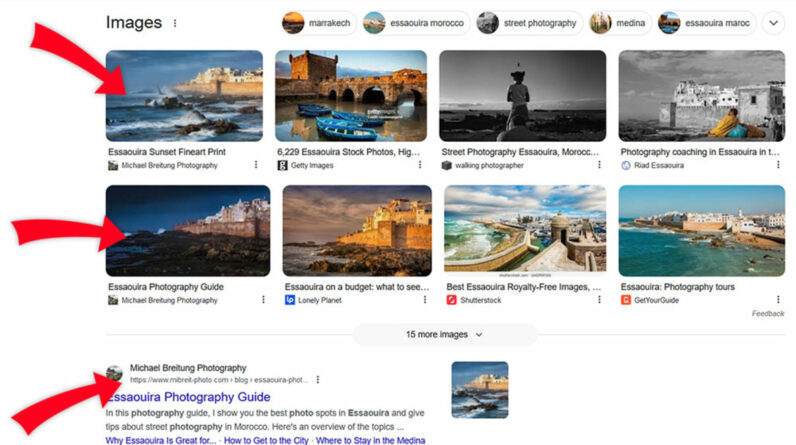
Now I will share some of my experience writing articles that rank in Google. As an example, I use mine Essaouira photography guide. I optimized it for the term “Essaouira Photography” and similar keywords. It’s not that hard to rank for and it’s not a high traffic keyword. But it fits my content strategy, it allows me to promote my own Photo tour in Morocco, and gives me an easy top 3 ranking. It is also perennial content and nothing related to news. It’s crucial for smaller photography websites: try to create timeless content and update it regularly.
With the recipe I’m showing you now and the SEO foundation in my first article, you’ll have a great chance of getting your content recommended by Google.
Informative title
With SEO, providing an accurate title that includes your keywords is more important than clickbait. Your target audience is people looking for specific information on a topic, not someone scrolling through social media apps whose attention you need to capture.
On my home page, I mostly use informative titles. However, for more contested keywords, it helps to make your titles a little bolder. So that once your article is in the top 10 of Google Search, it will be surrounded by similar content. Here, you want your title to stand out. For example, my guide to calibrating monitors is not just a “Monitor Calibration Guide”, but one “Definitive Monitor Calibration Guide”. If you use these adjectives, however, you should also deliver. You don’t want your website visitors to leave annoyed after a few seconds because of a misleading title.
Captivating feature image
My home page uses the first image of my articles as the feature image. But most content management systems allow you to set any image in your article as the featured image.
What is important is to select a photo that piques the searcher’s interest. Google will often display the featured image next to the list of search results and in the image search. Especially for image search, selecting a great photo will make your content stand out. Also, don’t forget to provide descriptive ALT text.
Clear structure and table of contents
Having well-structured content is not only useful for your readers, but it also helps Google understand your content. Especially for longer articles, avoid large blobs of text. Use subtitles. These are great for adding additional keywords.
If you provide a table of contents at the top, which links to your subtitles, Google will include them in search results. It makes the search listing more prominent and provides additional information for potential visitors.
Personal experience
My rule for writing articles on my website is to write only when I have something to say. If I can create an article in which I speak from experience, that is much more valuable than recycling information from the internet just to create a post for a trending topic. And as photographers, there are usually many topics we can share our personal experiences on. Think about the locations you’ve visited and photographed, the photo editing techniques you regularly use, and the gear you like. There is a lot to write.
This will also set you apart from AI-generated content, which at this stage mostly repackages existing information.
Internal links
When you read about SEO, you’ll often hear about the importance of backlinks – external links that point to your website. And it’s true, they are important. But you don’t have much control over them. Internal links are what you control. They are not comparable to backlinks to improve your ranking in Google, but they are still valuable.
One thing they help you do is keep visitors on your website for longer. Therefore, always think about the existing content on your website when writing new articles and provide links to them if related. In my Essaouira photography guide, I link to my Erg Chigaga photography guide to provide more context. Linking them not only helps readers navigate my site and find additional information. It also tells Google that these articles are related. It can increase the authority of the linked article. The effect is smaller than backlinks, but it’s low-hanging fruit.
Check your content
Once you’ve published a new article, you should double check to avoid errors. The first check is to use Google Pagespeed Insights to make sure your content loads fast enough. It will point out problems with suggestions on how to fix them.
Then go to the free keyword checker tool from seability, and let it rate your article based on the keyword you want it to rank for. I will provide you with guidance to further improve your content. Achieving a perfect score doesn’t guarantee your content will rank at the top, but most of the Keyword Checker’s suggestions are easy to implement.
Request for indexing
Don’t forget to add your new article to your sitemap. If you use WordPress, you will find plugins that do this for you. Also, head over to Google Search Console and request indexing, as it may take some time for Google to discover your article through the sitemap or internal links to your website.
It’s a good practice to check back a few days later and make sure Google has indexed your article. If it doesn’t within a week or two, you can head over to the “Page Indexing” section of Google Search Console. Check if your article appears in the section titled “Why pages are not indexed”. It’s common for parts of your home page to appear there. But make sure there are no essential pages. If this is the case, check the reasons and try to fix it.
Analyze and optimize
After your content has been online for a few weeks, check how it’s performing in Google Search Console. You’ll see how many impressions it got, how many clicks, its average search position, and also what keywords it ranks for. This last piece of information is useful. It helps you pick additional keywords that you can optimize your article for. Search for keywords with a lot of impressions but a small click-through rate. These usually have potential if they fit your theme well enough.
conclusion
Now it’s your turn. Use the information provided, get free visitors to your Google website and start converting them into customers. I still haven’t quite figured out that last part. Once I do, I’ll create another article about my findings.
Also, don’t worry if your articles take time to rank in Google. My most popular article didn’t appear in the top 100 for six weeks after I published it. Now it ranks first and brings me around 20 visitors per day. That’s pretty good for an article I wrote over half a year ago.
Also, once you have some articles online, look for opportunities to build backlinks. Maybe there is an opportunity to write a guest post somewhere and link back to one of your articles; it’s a great way to get backlinks while providing additional value.
[ad_2]
Source link





