



Do you work on an enterprise e-commerce site? If so, you likely need to optimize massive amounts of product pages using a product information management (PIM) system.
This article covers a step-by-step process of optimizing bulk products for SEO, highlighting some Excel formulas and third-party tools like ChatGPT and Grammarly to help make the process go faster for title, meta descriptions and product copy optimization.
Manage and optimize e-commerce product data
I will use some simulated PIM data as an example of my process. Depending on what you use to host your product data, you will have more or less product data (column) requirements, but the general strategy behind the process should be the same.
For my internal position, I do this based on the product release schedule. Once I know the SKUs for a product launch and the copy has been uploaded to our PIM, I can begin my optimization process.
Your company may have a different way of doing this, but again, the strategy is the same and you start with a massive list of product SKUs to optimize for.
To start this process, download the necessary data from your PIM to optimize your SKU list into Excel. Let’s start with one of the most important on-page SEO elements: the title tag.
The best way to formulate product page title tags is to use the product name followed by the company name or brand at the end. For e-commerce, you may also want to include color and size (although most of these pages should be blocked from search engines).
We don’t aim for fancy keywords or marketing experiments to test performance hypotheses for mass product optimization. We simply need to create a relevant product title tag.
If you’ve exported your data correctly, you’ll already have an empty title tag column. To start creating your product title tags, type =(refer to the cell with the product name). Drag the formula in that cell to the bottom of your SKU list.
Then add your company brand name to the title tag by creating a new column next to the title tag column and add ” | Your business name.” Make it all the way down to the list of SKUs.
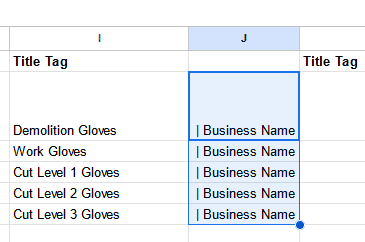
Finally, add a third column to combine the two cells by typing =(product name cell)&(company name cell) and press Enter. Now you will have them combined into a single cell.
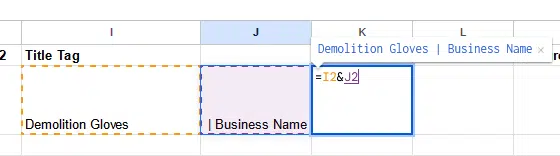
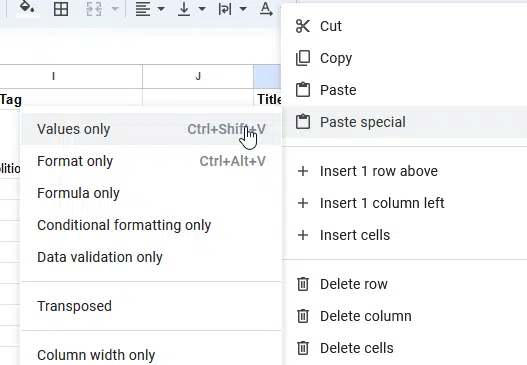
The next important step here is to pull the formula down, then make sure you copy the cells and paste them as a value (right click and “paste as value”) so that you no longer have a formula that feeds the cell. , but real text.
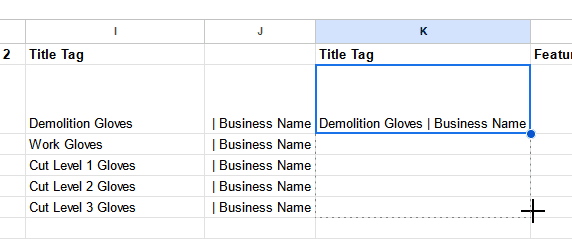
Now you can delete the other two columns. Just make sure your new column has the column name of the cell title tag.
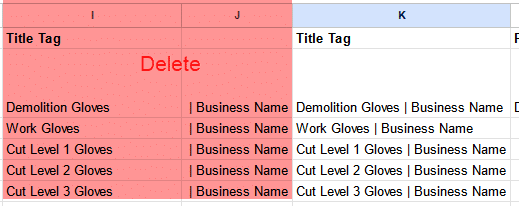
This is! Check out these beautiful title tags!
Dig deeper: How to write title tags for SEO with ChatGPT
Get the daily search newsletter marketers trust.
Copy of the product
For product copy, our goal is to make sure the grammar looks good and find opportunities to improve with additional keywords that your brand/marketing needs your help with.
The goal here is to conduct keyword research first to use keywords that your customers use to describe the product. (You can also use ChatGPT to speed up your keyword research.)
The tool I use for this process is called Grammarly. They have a nice chrome extension that I use. To get started, upload your product copy to Grammarly.
After reviewing your copy for a few seconds, it will provide you with grammar and spelling suggestions. Be sure to hit Accept Grammar or Spelling Change to update your copy.
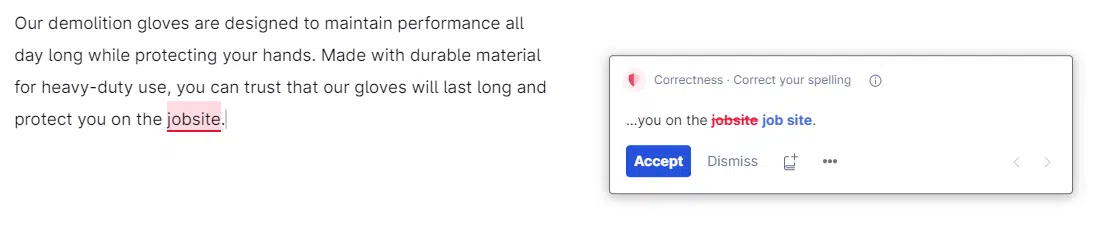
Note that I am only using the free version of Grammarly. With the premium version, you get access to features like passive voice identification and “propaganda” phrases, which might come in handy for you.
Now that you have grammatically correct sentences, you can copy and paste them back into your Excel file. Unfortunately, there is no quick way to do this for each SKU, so some of the process will probably take you longer. Once you’ve reviewed your entire list of SKUs and updated your product copy without errors, you can take a step back to work on your keywords.
If you’re like me, you have a couple of product copy versions: one for your site and one or more for reseller sites. You should try to make each version of your copy slightly different, as we know Google doesn’t rank well for duplicate copy.
Since working with branding or copywriting can be challenging, your flexibility to change could be difficult. In addition, you may be limited in the data you wish to share with ChatGPT or other solutions due to the data privacy of unlaunched products.

Dig Deeper: How to use ChatGPT to generate product descriptions at scale
I love meta descriptions because I like to see what ChatGPT creates. Its ability to write them has improved even with the GPT 3.5 model. (I haven’t seen a significant difference in quality with the Plus version.)
If you want to experiment, consider training a GPT SEO wizard to write meta descriptions.
To do this, I use the following message:
“Can you write me a meta description that is less than 165 characters of the text below that highlights the main product and its unique selling proposition?”
I know meta descriptions are based on pixel width, but this does the job. Ideally, we want to be closer to 155 characters or less.
After the initial request, I would add the product copy in quotes and hit enter.
This has worked surprisingly well and I use about 85-95% of what ChatGPT generates. While it could reword some parts, it generally captures the brand voice effectively. You can also specify your preferences when you write your request.
Below is what ChatGPT created for my copy of the “dummy” product. It ended up being 150 characters, which is great. I might adjust that last sentence as it seems a bit awkward.
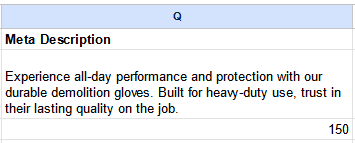
Similar to marketing copy, I haven’t found a bulk method that works for me. My process is to treat them individually.
If you have similar products, which is likely, you can speed this up by reusing meta description “bones” for other products in the group.
Marginal note: It took me several years in my career before I learned about the LEN Excel formula to count the characters in a cell. So for those who may not know, just type =LEN (cell you want to count) and hit enter.
Now you have the character count of the reference cell. Game changer!
Also, make sure you don’t forget to delete any cells with these formulas, as your PIM will likely reject your file for upload.
towards you
After finishing the process and reviewing it, you are ready to upload it. It’s a good idea to check that your changes have been updated as intended.
My goal for this article is to be concise and practical, offering a practical walkthrough of my process. Hopefully, you’ll find something to improve your own methods or spark new ideas.
While I’m not an AI or Excel expert (is anyone?), I’m open to learning better or faster methods from others. Share your ideas with me and the community! We all benefit from sharing and learning together.
Dig deeper: Why e-commerce brands need to showcase the authentic EEAT
The views expressed in this article are those of the guest author and not necessarily Search Engine Land. Staff authors are listed here.
[ad_2]
Source link





