


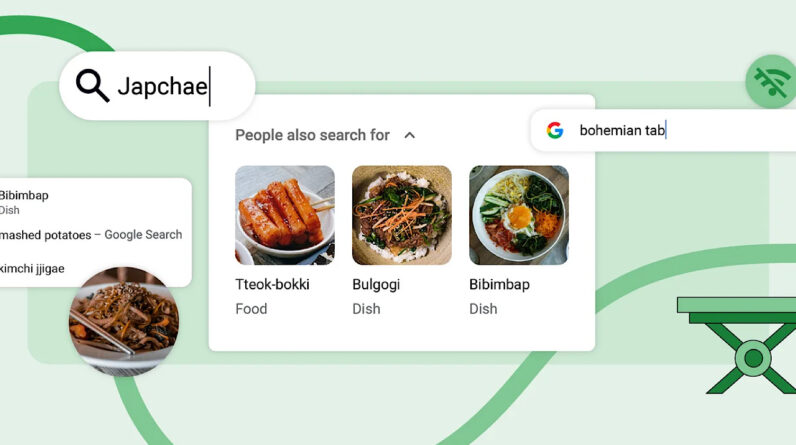
Google has published three new features so that your Chrome web browser provides more useful and relevant search suggestions.
Features use Chrome’s access to aggregated user data to provide aggregated recommendations.
Overview of new features
1. Search suggestions based on previous searches
Launched in the desktop version of Chrome, the first feature will provide personalized search suggestions in the browser’s address bar based on your past searches and similar searches made by others.
For example, if you recently searched for the Korean dish “Japchae,” Chrome can suggest other popular Korean foods like Bulgogi, Bibimbap, and Tteok-bokki to inspire your next search.
This collective approach allows Chrome to go beyond regurgitating a user’s search history and leverage the collective knowledge of what many others have searched for on a given topic. The feature provides a way to discover new ideas and side topics that you might not have considered yet.
2. Improved shopping search suggestions
The second feature enhancement focuses on searches related to mobile shopping.
Chrome will now show relevant product images along with search suggestions for broader categories, whereas previously, images were only shown for specific searches of a specific product name.
This allows for more visual navigation and inspiration for generic searches like “bohemian table” rather than needing to search for a specific table name up front.
3. Improved suggestions with limited connectivity
Finally, Chrome’s improved on-device search capabilities will now provide search suggestions even with a poor mobile internet connection.
By relying less on external server calls, users can get search ideas in Chrome when they’re offline or with limited connectivity.
The feature also works in incognito mode, providing suggestions while maintaining privacy.
Takeaways for digital marketers
For digital marketers and SEO professionals, these features highlight the growing importance of ranking for valuable long search queries.
As Chrome gets better at suggesting relevant ideas to users, optimizing content for specific searcher intent will become more important.
Overall, these additions provide smarter search assistance for Chrome users, while underscoring the need for brands to focus beyond keyword ranking.
Frequently asked questions
How will Google Chrome’s new search suggestions feature affect SEO strategies?
The introduction of personalized search suggestions based on aggregated user data and past searches means that SEO strategies must emphasize ranking valuable long-tail queries that align with specific searcher intent. With Chrome displaying product images for broader shopping categories, SEO professionals should ensure that products are optimized for textual and visual discovery. Finally, since Chrome now offers search suggestions in conditions of limited connectivity, brands should consider how their content can be maintained even in these scenarios, potentially targeting keywords that may appear in these suggestions.
What are the practical SEO applications of Chrome’s improvement of mobile shopping search suggestions?
SEO professionals should focus on comprehensive image optimization, including relevant alt text and high-quality images, to increase the likelihood of appearing alongside search suggestions for more product categories wide Creating detailed product descriptions that use a combination of broad and specific keywords can also help products stand out in these visual suggestions. For broader category terms such as “bohemian table”, it’s a good idea to include these phrases in your titles, headers, and meta descriptions to improve visibility.
How can marketers prepare content for Google Chrome’s enhanced on-device search capabilities?
Marketers should optimize their content to be cache-friendly for scenarios with limited connectivity, using lightweight pages and efficient coding practices. Ensuring relevant, high-quality content that can answer a range of user queries will help you heed Chrome’s on-device suggestions. It’s also beneficial to keep an up-to-date sitemap and use structured data to help Chrome understand and retrieve content quickly, even in incognito mode.
[ad_2]
Source link





