


Google’s popular gtag.js library facilitates data collection for Google Analytics 4 and Google Ads.
However, it also ties you into the Google ecosystem. You lose control and flexibility when tracking data.
Enter walkerOS. This new open source tracking library from ElbWalker aims to provide you with customizable control. It lets you send data wherever you want, not just to Google. It also claims better performance through a lightweight code base.
This article explores whether walkerOS lives up to its promises. We will also:
Compare its features, flexibility and ease of use with the Google tag. Learn about the cases where change makes sense, along with the potential downsides.
What is gtag.js?
The Google Tag, or gtag.js, is a Google JavaScript library that tracks and collects data, serving as a global link between your site and various Google services, such as Google Ads and Google Analytics 4 .
Unlike ga.js and analytics.js, which were limited to analytics only, gtag.js offers a unique solution.
It achieves efficiency by using other libraries instead of directly handling the capture of analysis and conversion data, essentially acting as a framework for those libraries.
This makes it easier during the configuration and integration processes while reducing the need for extensive code changes.
Gtag.js combines multiple tracking tags into one, unlike Google Tag Manager. This simplifies the user experience and allows for easier event detection and tracking across domains.
In general, it provides detailed information about visitor behavior and traffic sources more easily, improving its usefulness.
Go deeper: Google launches simple, centralized tagging solution
Why should you look for a gtag.js alternative?
While gtag.js is the industry standard for Google Analytics and ad tracking, there are situations where alternatives are preferred. Reasons include privacy, lightweight libraries, server data collection, and data ownership to avoid vendor lock-in.
Alternatives can provide better control over user data, helping to comply with regulations such as GDPR and CCPA. They may offer features such as data anonymization and selective data collection. This ensures that data is handled in accordance with the organization’s privacy policies, reducing the risk of sharing data with third parties.
Page speed is vital, so optimizing the performance of your JavaScript library is important. Although gtag.js is lightweight, using multiple libraries can slow down a site.
Smaller libraries improve load times, improving the user experience, especially on mobile. Consider multi-target libraries for better performance.
From a data security perspective:
Sensitive information can be kept more secure and the risk of being intercepted or manipulated by the customer is reduced. Server data collection can avoid issues related to ad blockers or browsers restricting tracking scripts, which could provide more accurate analytics data.
Alternative exploration offers flexibility in data management, avoiding vendor lock-in and price limitations.
Owning your data enables seamless integration with multiple systems and custom analytics solutions. For example, if consent is denied for Google Analytics 4, your tagging server may not receive all data.
What is walkerOS?
This is where the walkerOS library comes into play.
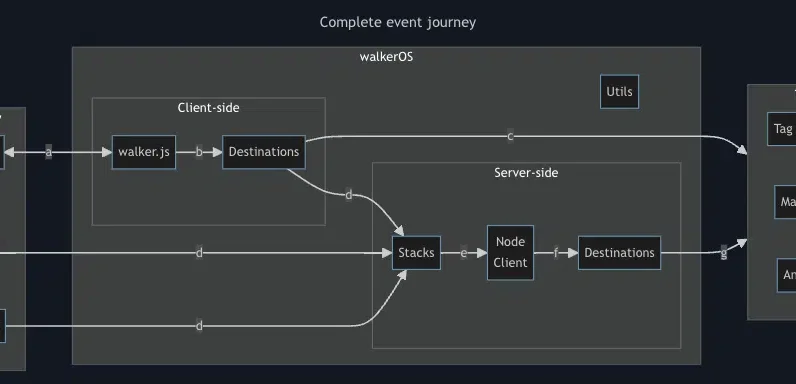
WalkerOS (also known as walker.js) provides a flexible data management system, allowing users to tailor data collection and processing to their needs.
It is designed to be versatile, from simple utilities to complex configurations. Its main purpose is to ensure that data is sent reliably to any chosen tool.
Simply put, you can implement walker.js and send data to all the sites for analytics and advertising purposes that you need. You don’t have to have a lot of different tags.
The walkerOS event model provides a unified framework to meet analytics, marketing, privacy, and data science demands using an entity-action methodology.
This approach, fundamental to walkerOS, systematically classifies interactions by identifying the “entity” involved and the “action” performed. This structured yet adaptable model ensures a comprehensive understanding of user behavior.
WalkerOS stands out for its adaptability in event monitoring, allowing customization based on specific business needs rather than conforming to pre-established analytical frameworks.
The philosophy behind walkerOS is to make tracking intuitive and understandable for all stakeholders, improving the quality and usefulness of data within an organization.
Get the daily search newsletter marketers trust.
Working with walker.js and what to consider
Getting started requires knowledge and understanding of technology, but it’s not as difficult as it seems. The walker.js web client can be implemented directly from code using Google Tag Manager (recommended) and via npm.
All events are now sent to the data layer from where we can initiate tagging using Google Tag Manager.
The tagging process means we want to define the events we want to capture and send, such as filter usage, e-commerce purchases, cart adds, item views, and more.
Walker.js provides a good number of triggers that we can use starting with click, load, submit, hover or custom actions. You can also add destination tags and define where to send captured data.
Walker.js works in previous destinations like Google Analytics 4, Google Ads, Google Tag Manager, Meta Pixel, Piwik PRO and Plausible Analytics. It also provides an API to send custom events to any destination that can receive them.
I recommend using theirs demo page to play with
Switching from gtag.js: what to consider
Switching from gtag.js to an alternative like walker.js for tracking and data collection comes with considerations and potential pitfalls, depending on your specific needs and configuration. Here are some of the main points to consider:
Integration with Google products
In terms of integration, gtag.js is designed to work seamlessly with Google’s suite of products, including Google Analytics, Google Ads, and more.
An alternative like walker.js doesn’t offer the same level of native integration, which can complicate configuration with these services. You need technical knowledge to implement and maintain.
Feature support and customization
Gtag.js supports a wide range of out-of-the-box features tailored to Google platforms. Walker.js may not support all of these features directly or may require additional customization to achieve similar functionality.
Ease of implementation for Google users
Gtag.js offers a simple implementation process for those already using Google products. Users may find that walker.js requires more technical knowledge to customize and integrate effectively.
Google’s extensive documentation and community support make troubleshooting and learning easy. Walker.js, being less widespread, may have more limited resources for support and guidance.
Exploring GA4 data collection and tracking options
The decision between using gtag.js or switching to an alternative like walker.js depends on your specific use case and your needs. If you rely heavily on the Google ecosystem and want seamless integration, gtag.js is probably the best choice.
However, for those who need greater control and flexibility with their data collection and usage across systems, walkerOS offers a lightweight and customizable tracking solution.
While setup requires more technical knowledge, the ability to own your data and reduce vendor lock-in offers long-term strategic benefits for many businesses.
Go deeper: How to set up Google Analytics 4 using Google Tag Manager
The views expressed in this article are those of the guest author and not necessarily Search Engine Land. Staff authors are listed here.
[ad_2]
Source link





