


Google has announced a new trend change detection feature in Google Analytics.
This new capability will allow you to more easily identify subtle but significant changes in data trends over time.
We’ve just introduced trend change detection, a new type of insight that shows subtle but lasting and important changes in your data. It works like anomaly detection as both detect a change in the data. The main difference is that anomaly detection suddenly stands out… pic.twitter.com/RYqzikf8r1
— Google Analytics (@googleanalytics) February 13, 2024
What is trend detection?
Trend change detection is designed to detect gradual, long-term changes in metrics rather than sudden spikes or drops.
While Google Analytics already has anomaly detection to highlight abnormal peaks or dips, this new feature focuses on more subtle changes in data trends that span weeks or months.
How it works
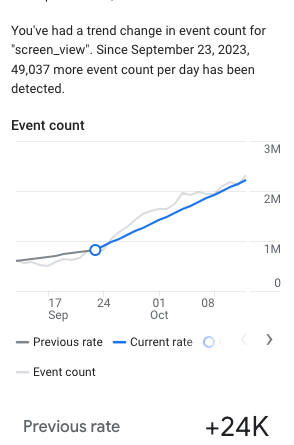
When Google Analytics detects a change in the direction of a metric’s time series data, it superimposes a marker on charts and graphs on the date the change occurred.
You can hover over the marker to see details about the change, including past and current rates of change and the exact date the trend changed.
Screenshot from: support.google.com, February 2024.
Clicking “Investigate Report” will open a more detailed view to further analyze the data. You can adjust the date range, compare other dimensions, and add breakdowns to better understand what’s driving the trend change.
Why trend change detection is important
Unexpected downward trends require investigation to determine the cause. For example, a website code update could inadvertently break a signup button, causing stalled user growth.
Without trend detection, it could take weeks or months to notice the gradual decline in new records.
Google Analytics uses a signal segmentation algorithm to detect trend changes in time series data. For daily data, examine approximately 90 days of history. For weekly data, the algorithm looks at about 32 weeks to identify potential trend changes.
Where you will see trend change detection
Trend changes will be displayed in the following places in the Google Analytics interface:
Info cards on the main home page The reporting snapshot page The advertising snapshot page The specialist information center
Types of trend changes detected
The new detection capability is designed to show the following types of trend changes:
Increase to decrease (deceleration of growth) Decrease to increase (reverse decrease) Greater increase or decrease (accelerating growth or decrease) Smaller increase or decrease (decelerating growth or slowing decrease)
Tips for using trend change detection
Leveraging Google’s new granular trend tracking provides an advantage in diagnosing opportunities and threats in organic data patterns.
Tracking organic traffic metrics week-to-week and month-to-month allows you to spot unexpected downward trends that could indicate issues like:
Penalized or blocked sites New algorithm updates that reduce ranking Technical SEO issues that prevent crawling and indexing
Early detection of these trend changes allows you to investigate and address root causes quickly.
FAQ
How does trend change detection differ from anomaly detection in Google Analytics?
Trend detection and anomaly detection are two different features of Google Analytics that suit different analytical requirements:
Trend change detection is designed to identify prolonged and gradual changes in metrics over time rather than immediate and sharp fluctuations. Anomaly detection highlights irregular peaks or dips that deviate from standard data patterns. Together, they provide a comprehensive overview of both short-term anomalies and long-term trends in the data.
How can marketers effectively use Google Analytics trend change detection?
Marketers can take advantage of trend change detection to maintain monitoring of website performance in the following ways:
Regularly monitor the dashboards and reports in Google Analytics to detect and investigate any marked changes in data trends. Use the “Explore the Report” feature to dig deeper into the data and understand the dynamics driving these changes. Quickly address issues flagged by downward trends that may indicate technical SEO issues, penalties, or adverse effects of algorithm updates.
Featured Image: Produced by Vladimka/Shutterstock
[ad_2]
Source link





