


Instagram is a highly visible and shareable social media platform.
Behind Instagram’s sleek and social look lies a sophisticated lead generation machine. As Meta has become a digital media behemoth, so has Instagram.
Over the past few years, Meta has unified Facebook, Instagram and (to a lesser extent) WhatsApp into one integrated advertising platform.
Advertisers have three main methods of generating leads through Instagram: organic, push, and ads. This article will discuss each.
Generation of organic leads
Advantages
Disadvantages
Limited to organic reach Results cannot be targeted or optimized
Organic refers to unpaid tools and strategies for developing content on Instagram. Whenever you post something to your Instagram account using the app, you’re doing it “organically.”
It is possible to generate some leads through your profile and content organically. However, unless your account has very high visibility and organic reach, doing so with any consistency or volume will be challenging unless you use paid tools.
The number of Instagram users who will see your organic posts will be limited by:
Your current followers. The engagement rate of your content. How searchable your content is.
In other words, you are at the mercy of the “algorithm”.
But here are a few things you can do to maximize your chances of generating interest (and potentially leads) in your brand through organic Instagram:
Switch to a business profile
Set your profile aa Company profile to take advantage of built-in tools such as ads, call-to-action (CTA) buttons, and the ability to add contact information to your profile.
Optimize your profile information
Use a recognizable profile picture, such as your logo. Create an engaging bio with clear company information and be sure to include a CTA (eg, visit our homepage). Use a service like Linktree to give profile users multiple options to visit (such as a contact us page for potential customers).
Use stories
Use Instagram Stories to share your content outside of the feed. Stories also allow brands to include “swipe up” CTAs.
Engage with your audience
Respond quickly and consistently to comments on your posts. Always look for opportunities to convert interest into action by referring users to your website. Use Instagram direct messages to share additional information with interested prospects.
Boost publications
Advantages
Better reach than organic Simplified process
Disadvantages
Not as many options as the ad manager Less control over targeting
If you’re an advertiser looking to put promotional dollars behind your Instagram, but don’t want to know the ins and outs of the ad manager, Boost might be right for you.
Think of Boost as “paid lite,” a tool that gives you a simplified process for promoting your Instagram content. Start by selecting one of your Instagram posts from your library and tapping the “Favorite Post” button. From there, you will be guided through the steps.
Depending on whether you have made similar improvements to Facebook, you will have the option to select with or without using a Facebook Page.
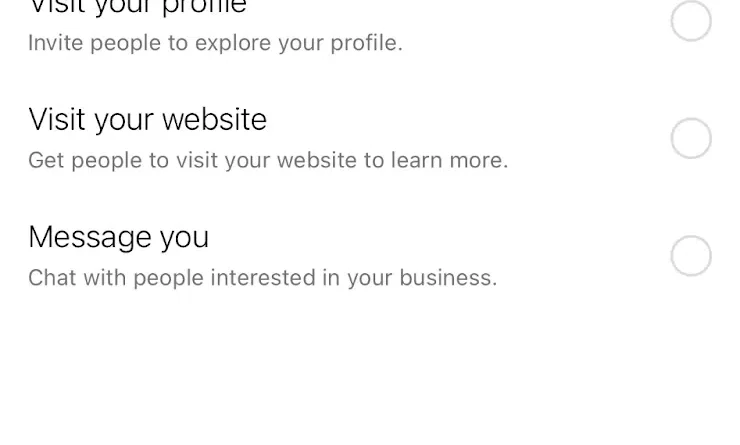
Next, you will select your target. This is the action you want people to take and the one Instagram will try to optimize for performance.
For lead generation, we recommend “Visit Your Website” and have a method to contact them. Otherwise, you can encourage incoming messages via Instagram DM.
After that, you will have the option to select your target audience. You’ll have two options: a “Recommended Audience” and the option to create your own.
Your Recommended Audience will consist of Instagram followers and other people that Meta thinks are similar to you. The option to create your own allows you to select specific locations, interests, and some demographics such as age and gender.

The first option will probably get you a better response, while the second option allows you to build a larger audience and refine their interests.
By selecting particularly engaging Instagram posts and boosting them, you’ll have the ability to get more and more targeted views to your content.
Boost also gives you better control over how your audience will respond.
Ads Manager
Advantages
Highly customizable Better long-term results
Disadvantages
It can be difficult to learn
To fully embrace lead generation on Instagram, you’ll need to use Ads Manager and create a campaign that’s fully optimized for lead generation.
Setting up a meta ad account can be complicated and the process is long enough to merit its own article. Instead, we’ll start with the assumption that you have your ad account created and your Instagram linked. If you don’t, please follow this guide.
In Ads Manager, all Meta properties are one big happy family. You can advertise on Facebook and Instagram somewhat seamlessly.
With a few exceptions, Meta does not recommend running separate campaigns for your Facebook and Instagram ads. It is inefficient; you’ll probably see better results if you keep them together.
So for this explanation, we’ll keep things unified unless otherwise noted.
Learn more: How to Use Meta Ads for Lead Generation: A 9-Step Guide
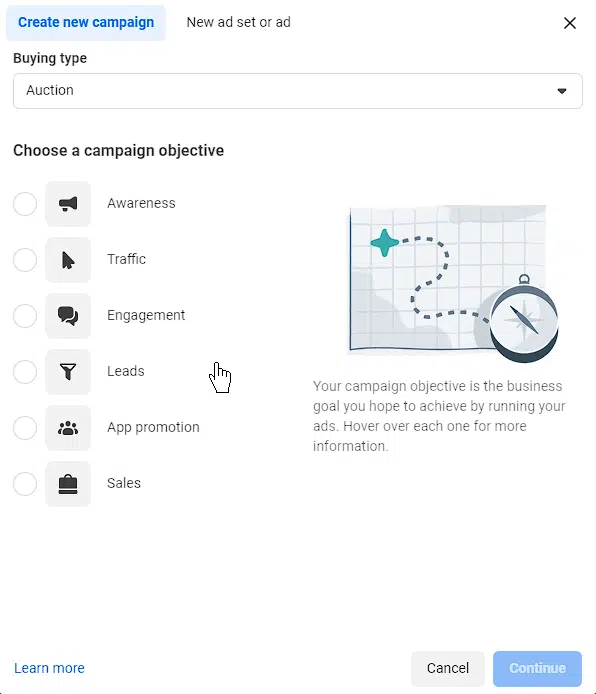
Select your target
Your goal is the goal of your campaign. This can range from simple awareness to lead generation. Select Leads from the options provided.
Next, Meta will give you the option of a “bespoke” lead campaign, which uses automation to generate the necessary leads.
We’ll use this path as an example, since the custom option is largely the same but with more options.
There are three main methods to generate a lead within this type of campaign:
Instant form chat calls (Messenger and Instagram).
Instant Forms
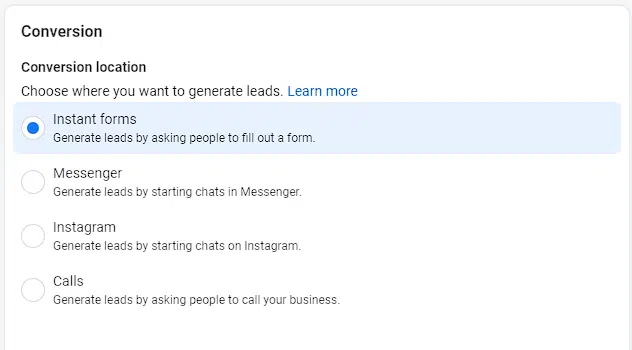
This allows advertisers to create a contact form and have potential customers fill it out directly on Instagram without leaving the experience.
The first step is to create a lead generation form using Meta’s instant form builder. You can choose a template or create your own.
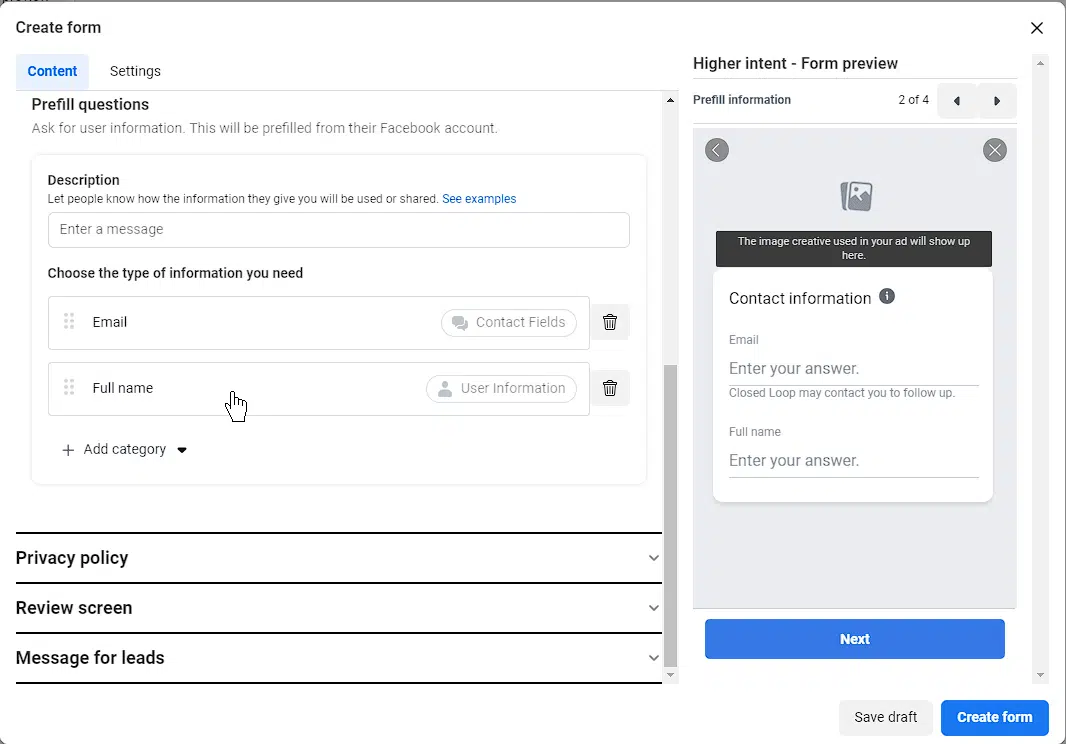
Upload some brand assets and create the questions you’d like to ask your prospects. These can be multiple choice or short answer.
Once your questions are outlined, select the pre-set questions you want to ask your prospects. Metas will be auto-populated based on the user’s profile information and consist of questions such as name, email, location, etc.
After you’ve selected your questions, complete the form and attach it to your creative in Ads Manager. When someone clicks on your ad, the form will open and allow them to fill it out.
Lead Form Tips
Always use “high intent” forms to avoid spam and accidental entries. Keep the number and intensity of questions you ask to a minimum, as more and more personal questions will affect your conversion rates. Use filter questions to maximize the quality of your leads by weeding out unqualified respondents. Integrate your CRM system with Meta to ensure that generated leads flow directly into your database.
chats
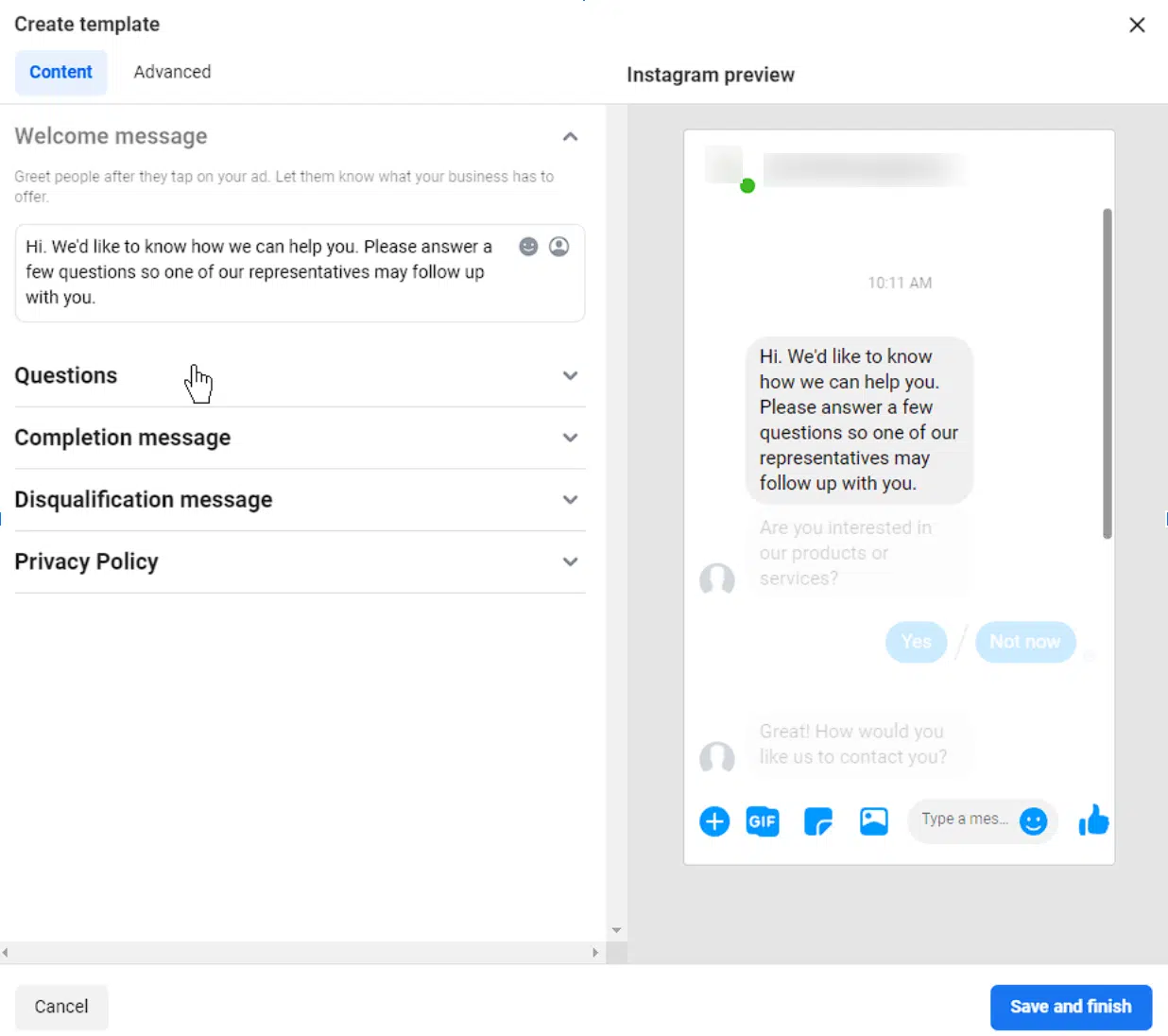
Chats (Messenger and Instagram) allow your audience to start a direct message (DM) conversation with your account.
Once an ad is clicked, an Instagram DM will open with your account, allowing you to communicate directly with the prospect.
Just like lead generation forms, you can create a script to ask your prospects questions and let them enter the information manually or type in a response.
This script can be as long or as short as desired. It can also be used as a lead generation chatbot or as a simple greeting to start a manual conversation with your prospect.
calls
This allows the audience to tap or click to call the number of your choice.
This is the easiest lead generation route as it requires nothing more than a simple phone number to direct incoming calls.
Note that Meta cannot optimize call quality. While this type of campaign is likely to get your phone ringing, it may not be a well-intentioned prospect on the other end.
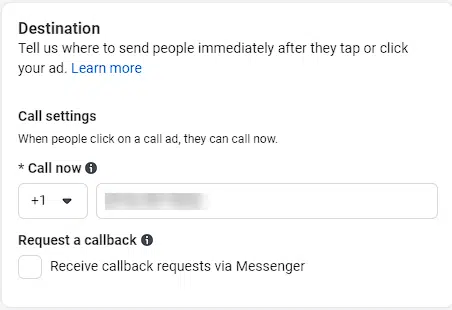
Prospects can also request a callback if you select the option. This will send a message to your account that someone is interested in talking to you, but can’t talk right now.
Create your ad set
Once you’ve determined how you’d like to generate leads, you’ll need to finalize the setup. This involves three important components at the “ad set” level:
budget Schedule. guidance
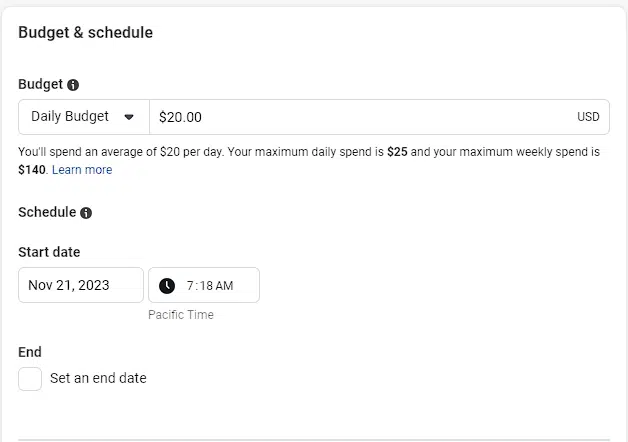
Budget and schedule
this lets you choose how much to spend for what duration. Budgets can be set on a daily or lifetime level. Scheduling lets you choose how long the campaign will run and when it will start and end.
Dig deeper: How to set up your Facebook and Instagram ad budgets for maximum results
guidance
Ads Manager gives you many targeting options, including location, demographics, interests, and your own data.
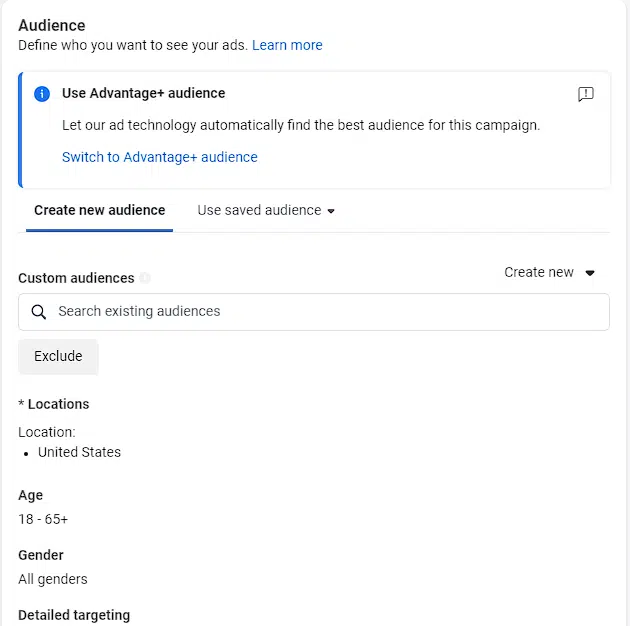
Select your ideal audience using the available options or use an AI-powered “Advantage+ Audience” to simplify the process.
You can be as broad or as specific as you like. Just know that the smaller the audience, the more expensive your media costs will be.
Create your creativity
The last step in the process is creating creativity. This requires an image and text.
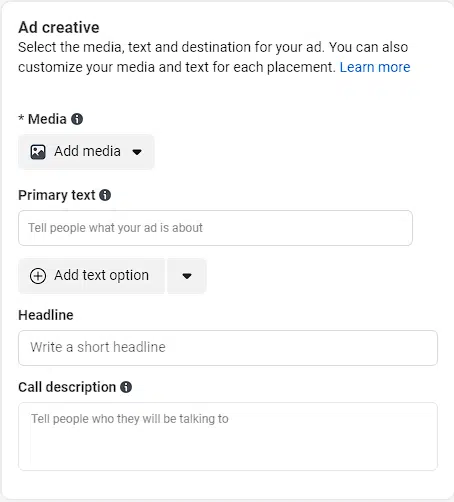
For Instagram, we recommend having images that are 1×1 and 9×16. This will fit all locations on Instagram, including feed, stories, and reels.
Having aligned 9×16 (vertical) images will make your ads stand out in these highly visible and attractive placements.
Unlock the lead generation potential of Instagram
Generating leads through Instagram is now easier than ever. With multiple options to suit all levels of sophistication and budgets, Instagram allows marketers to generate leads through multiple contact types.
While the learning curve for generating leads using Ads Manager can be daunting for some, Meta’s recent focus on automation and simplicity has reduced the learning curve.
If you’re looking to grow your lead list, I suggest using Ads Manager, specifically lead generation forms and chats, as it offers a high degree of customization and potential for growth.
The views expressed in this article are those of the guest author and not necessarily Search Engine Land. Staff authors are listed here.
[ad_2]
Source link





