


Google Ads is among the most effective and complicated platforms in the world. With a complex PPC platform, how can you be sure you’ll get the best performance?
Something that isn’t often addressed is Google Ads’ dual goal of generating revenue for advertisers and for itself, and not necessarily in that order. I always remind customers of Google’s only stated source of revenue, which is “sell ads, nothing else.”
This article addresses some less obvious areas of the Google Ads platform that generate higher investment without providing clear performance for advertisers. These configuration changes are quick and easy and will ultimately improve campaign performance and increase budget allocation.
1. Turn off or heavily review automatically applied suggestions
If you’ve spent time on the Google Ads platform over the past few years, chances are you’re familiar with Campaign Optimization Recommendations and Scores.
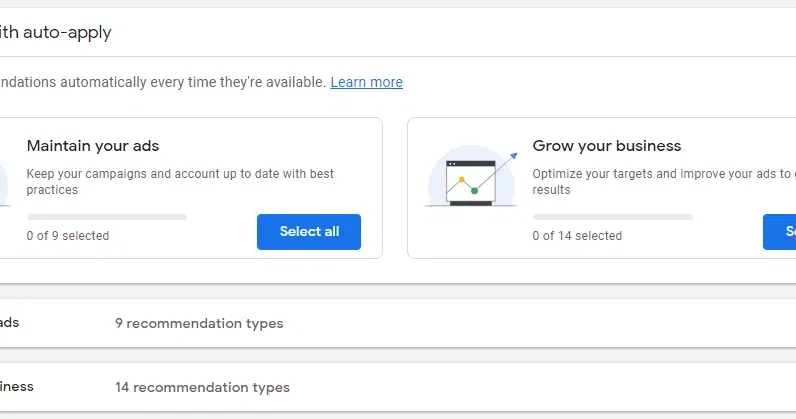
Many don’t know that when your account is created, Google automatically implements an auto-apply feature for some of your campaign recommendations. If this feature is left on, Google will automatically apply these recommendations every 14 days.
For the inexperienced ad operator, this sounds like a dream! Google’s artificial intelligence and machine learning technology will work on your behalf. But proceed with caution!
Google breaks down its auto-apply options into two categories:
“Keep your ads.” “Grow Your Business.”
As the platform describes, automatically applied suggestions will only keep your campaigns up to date with Google Ads “best practices” or actively optimize campaigns and improve your ads for better results.
Areas where automatically applied suggestions can blow your budget away
Google’s increased desire for AI, ML and automated advertising is hitting a brick wall for certain advertisers who can’t clearly define the value of each conversion they receive.
Take, for example, a large accounting firm to which I consult. Their services are highly customized to the companies they serve and there’s no telling what a potential customer will be worth. Two different leads for the same service, such as a business audit, can vary in value by tens of thousands of dollars.
Google’s automated suggestions are highly dependent understand the value of each desired conversion. Conversion values allow the system to determine the most profitable keywords, ads, and landing pages based on the value generated. The system can then begin to identify and bid on new keyword phrases to generate more impressions, clicks and conversion opportunities.
This can be serious due to an increase in bids for irrelevant keywords due to the large number of impressions, clicks and conversions they can produce. Google’s program cannot perfectly account for humans confused or misled by its ads.
A recent client wanted my team to analyze their Google Ads performance over the past 12 months and provide suggestions for improvement. This client provides television and Internet broadcast services to major West Coast networks for live and filmed events.
Unfortunately, the company’s name can easily be mistaken for a television helpline service for troubled consumers. In your case, automated additions of broad match keywords lead to ads showing many terms related to solving Hulu and Hulu subscription issues. The customer reported daily calls and emails from disgruntled Hulu customers wanting help with their accounts.
To make matters worse, Google representatives had helped the customer set up conversions around phone number interactions and form submissions, but no one was monitoring what phrases the system automatically added to the customer’s search terms.
System metrics showed a steady increase in impressions, clicks and even conversions. Ultimately, the client spent nearly $1,000 over six months on irrelevant phone calls and emails because low-quality keyword suggestions made it to search terms through the autoapply feature.
Leveraging Google’s automation tools can significantly reduce your workload, but it’s essential to be alert and not assume that your goals will be achieved automatically without supervision.
2. Dive into Advanced Location Settings: Presence vs. Presence or Interest
One of the most common areas I see clients lose ad dollars is due to incorrect location targeting.
Conveniently hidden behind an expansion feature for “Advanced Location Options,” Google’s default selection shows your ads to people in or interested in your targeted geo-locations.
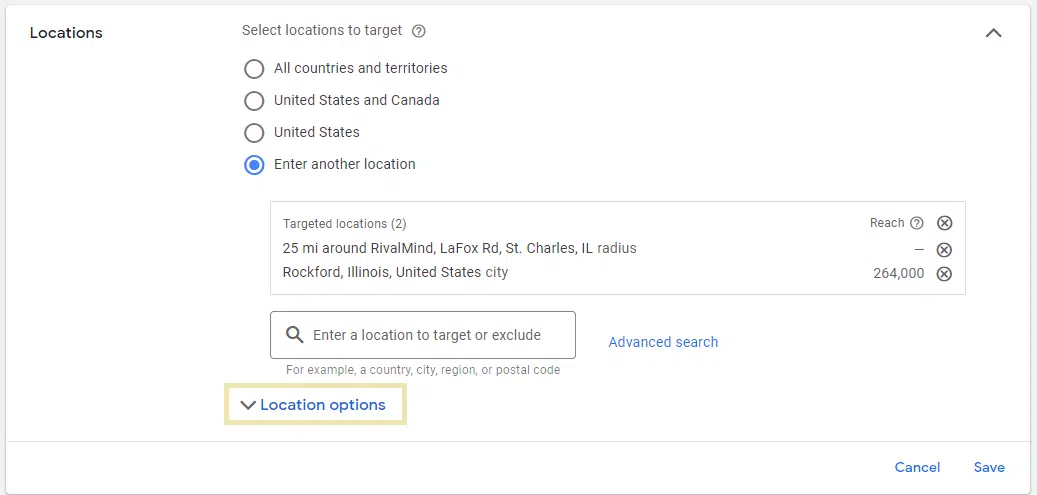
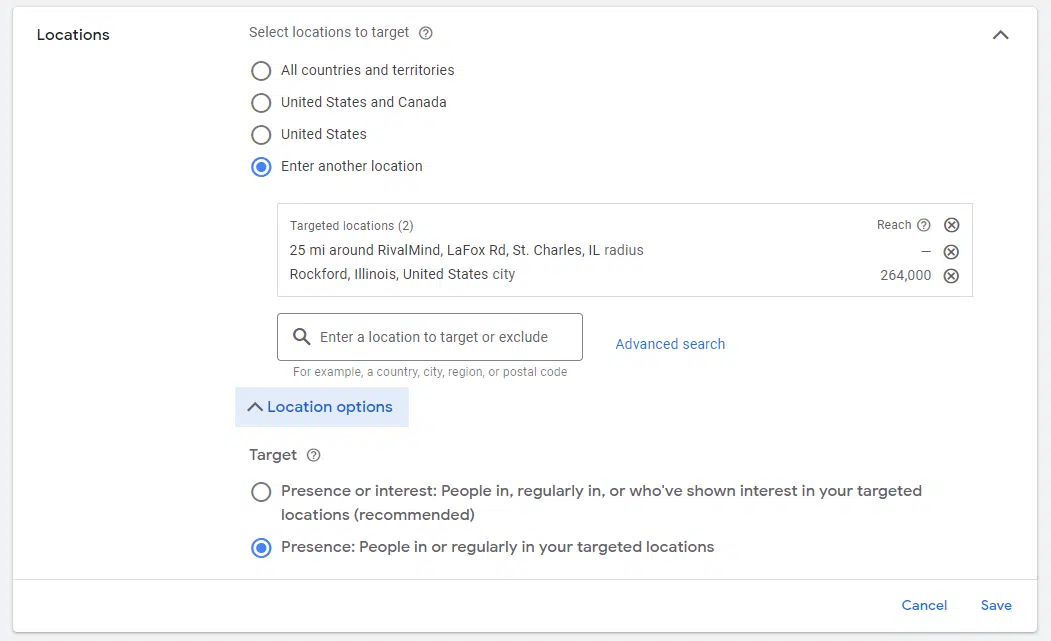
In my experience, clients targeting large, internationally recognized cities like Los Angeles, Chicago, New York, etc. suffered the most budget loss because international searchers were included for their “interest” in the target city
Google’s documentation indicates industries like Real estate, education and travel saw +5% conversions targeting “presence or interest”.
This makes sense because in all three cases searchers are looking for information about places outside of their current location (ie I live in Texas but I’m researching vacation spots in Maine). It makes sense to show me these ads.
However, when your product or service is only available to people within a specific geographic area, it’s best to avoid showing ads and paying for clicks from irrelevant users.
By showing your ads only to users in your target locations or regularly, you negate any possibility of spend on clicks from geographically irrelevant users.
Get the daily search newsletter marketers trust.
3. Reconsider using broad match search terms
When I first started learning the Google Ads strategy, Google’s method of processing searches was very literal. Broad match phrases allowed Google to trigger your ad for any individual word in the phrase you provided.
A phrase like “best pro golf balls” would result in your ad being activated for new search terms like “best pro golfers,” “pro golf courses,” and “best golf lessons.”
For vigilant advertisers trying to run targeted ads and generate quality leads, broad match terms simply pile on trash phrases and charge you for them.
I’ve only recently changed my mind on this topic, and it has to do with the introduction of BERT in 2019 and Google’s massive updates to keyword match types and how they work.
Google reps suggest that at least 20-30% of your keywords should be broad match
Google match type update expanded the rules around the three main match types. All match types now include consideration of the intent behind the keyword, not just the words in the targeted phrase.
Just like organic search results, Google now applies search intent to its match types and tries to understand the search intent behind each phrase. This will allow the system to identify other phrases with the same or similar intent and present them to you as options to bid on.
At first I was skeptical and ignored the changes. But then, top customers started losing conversions, and once-trusted targets began to underperform. The main problem? A noticeable drop in print volume.
The aha moment came during a call with a Google Ads representative, something I normally avoid because my life depends on it.
He suggested changing the ratio of my keyword match types to include 20-30% broad match terms so that Google AI could identify more phrases that match my initial keyword and the intent of my selection original
Reluctantly, I revised my previous exact match and best performing terms and included their broad match variants as well. Within two weeks, I saw dozens of new search term options that I hadn’t seen before. Impressions came to life and regained traction.

As I suspected, irrelevant phrase impressions and clicks increased substantially, so I had to add search term tracking to my daily routine for a few weeks.
Within 90 days, I had included enough negative terms. Irrelevant searches decreased.
Optimizing Google Ads performance through simple configuration
For anyone using Google Ads, newbie or seasoned vet, it’s critical to remember that the Ads platform is designed to serve Google’s purposes first, and yours second.
By turning off automatically applied campaign modifications or by keeping track closely, you can prevent Google from making changes that aren’t 100% aligned with your marketing strategy and goals.
Understanding that your ads have the potential to be shown to irrelevant users simply based on geography, and controlling which locations your ads are shown in can save you from burning a precious price tag.
Finally, Google’s systems have made significant progress in processing and using broad match keyword phrases. If you currently have high-performing exact match phrases, consider adding broad match variants to explore additional phrase ideas you might not have thought of. However, don’t forget to monitor new search term suggestions and remove anything that isn’t relevant.
The views expressed in this article are those of the guest author and not necessarily Search Engine Land. Staff authors are listed here.
[ad_2]
Source link





