


Google Merchant Center is a valuable but overlooked resource for e-commerce advertisers. It offers free analytics on product performance, pricing, demand and more.
This article shows how to mine these insights to make smarter decisions about inventory, pricing, and assortment.
We’ll explain how to pull data from Merchant Center into BigQuery for powerful analytics and use the Shopping Content API to automate feed updates.
Manage Google Merchant Center data
Google Merchant Center offers a set of reports to improve your online advertising strategy.
Performance report
Provides a detailed breakdown of ad data and free listings.
Best sellers report
Provides information on the most popular products and brands in both paid and unpaid listings, including inventory status. It allows historical data analysis, allowing you to fill in data between countries or categories for up to two years.
Price competitiveness report (formerly the Price Reference Report) Provides product-level attributes and price reference data, alongside information available in Merchant Center. This data can be loaded into BigQuery as described in the Merchant Center price competitiveness table schema.
Price information report
It provides valuable suggestions on product selling prices and forecasts performance after price updates, helping to develop effective pricing strategies. The Merchant Center pricing data table schema describes how to integrate this data into BigQuery.
Together, these reports provide a comprehensive view of market trends and competitive positioning. With these insights, you can make informed decisions for your online retail efforts.
Merchant Center data via the Content API
Leveraging the Shopping Content API with Google Scripts provides a robust and dynamic way to access and manage Merchant Center data.
This combination is a powerhouse for marketers looking to automate and streamline their data workflows.
The Shopping Content API provides direct access to your Merchant Center for:
Perfect handling and recovery of product data. Price updates. Inventory management.
Scripts can be written to:
Get data from Merchant Center via the API on a regular basis. Update product listings. Notify you of changes in prices or inventory levels.
To use the Shopping Content API:
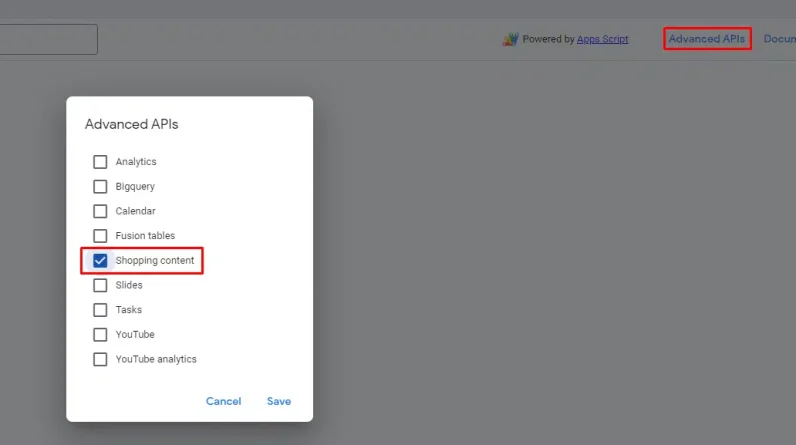
Go to the script configuration interface and click Advanced APIs. Turn on the verification flag on Shopping content.
Using the Shopping Content API with Google Scripts makes your Merchant Center a highly responsive and adaptable part of your toolkit. Allows:
Real-time data interaction. Bulk operations simplified. Exporting information from Merchant Center to Google Sheets or any other destination accessible via ad scripts.
Merchant Center data using BigQuery data transfer
Moving data from Merchant Center to BigQuery is a game changer for marketers and data analysts when dealing with big data.
To unlock a treasure trove of insights, channel rich and detailed data from Google Shopping into BigQuery. This integration allows you to:
Analyze market trends. Track product performance. Understand consumer behavior at a granular level.
It’s not just about having data; it’s about making that data work for you.
With BigQuery’s powerful analytics capabilities, you can slice and dice your Merchant Center insights.
This process turns raw data into actionable insights, uncovering patterns and opportunities to inform strategic decisions and improve the competitiveness of your campaigns.
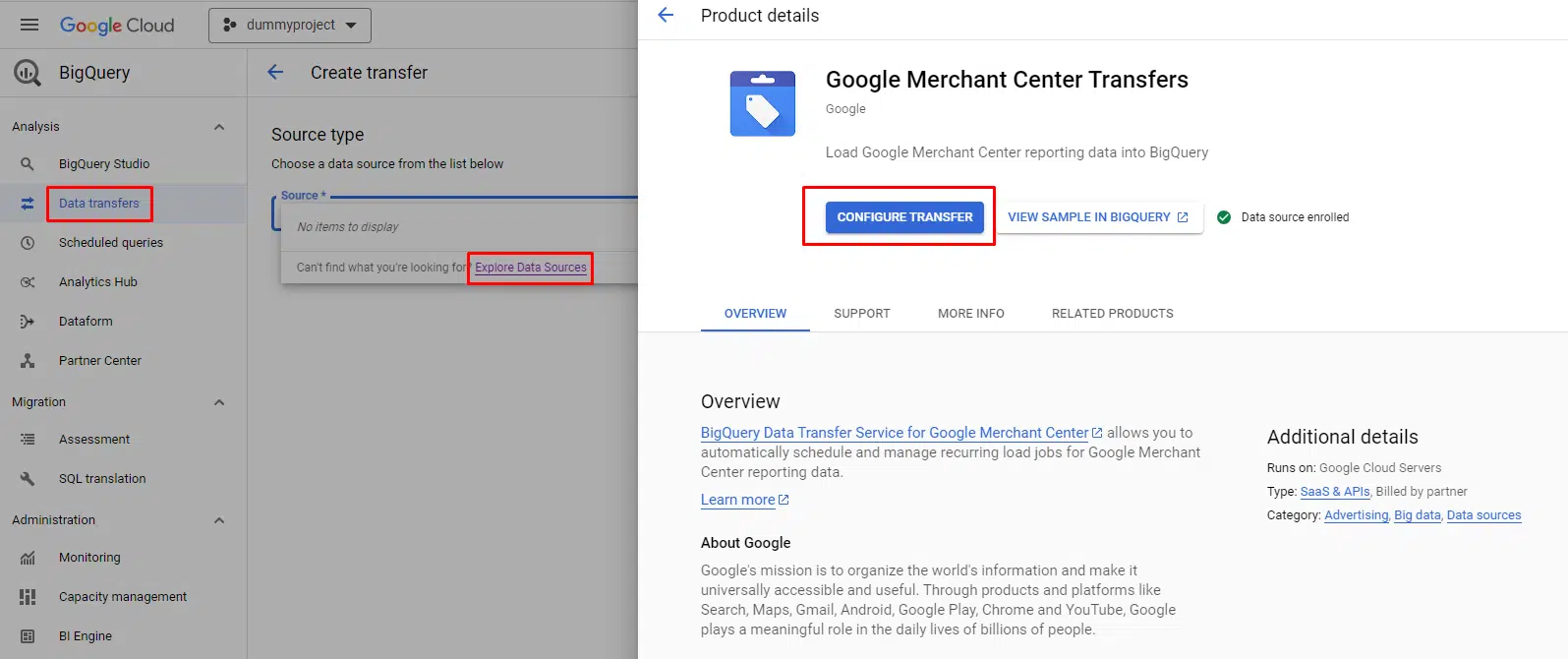
Merchant Center data transfer can be configured in the data transfer menu. Note that a billing account is required, even if the data transfer volume is small or no data is transferred.
Learn more: How to optimize your free product listings on Google Shopping
Product feed data enrichment
Below are real use cases that anyone can implement and benefit from.
Whether the data is collected using BigQuery or fetched using the Shopping Content API, you can enrich your product feed with valuable information once the data transfer is set up.
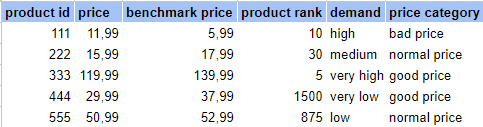 Example of feed columns
With new information about reference prices, product classifications, and demand, you can group products into new buckets.
The idea is simple:
If there is demand in the market, the products must be sold. And if the price is good, or at least normal, the products will most likely sell. On the other hand, low demand or poorly priced products can be classified into different campaigns to keep the focus on top potential products.
Now you can execute specific pricing strategies and apply statistics from price competitiveness benchmarks to compare and adjust your prices relative to competitors.
Other ways to improve inventory management include:
Using best seller reports to analyze your current inventory with popular products. Identify potential new additions and optimize your inventory with data segmented by Google product categories and geographic markets.
The options are diverse and can be individually configured based on your business goals. You need a stable transfer of data from Merchant Center to a platform you can work with (eg BigQuery or Google Sheets).
No need to guess what products might work and what targeting might work for you. You can just look at real-time market data and overlay your inventory to adjust your advertising strategy.
Learn more: How to set up feed rules in Google Merchant Center and ensure product data quality
Get the daily search newsletter marketers trust.
I recommend the following two projects from Google’s GitHub repository for reporting. Although they are unofficial and only supported by a few Googlers, these solutions work well to improve your reports.
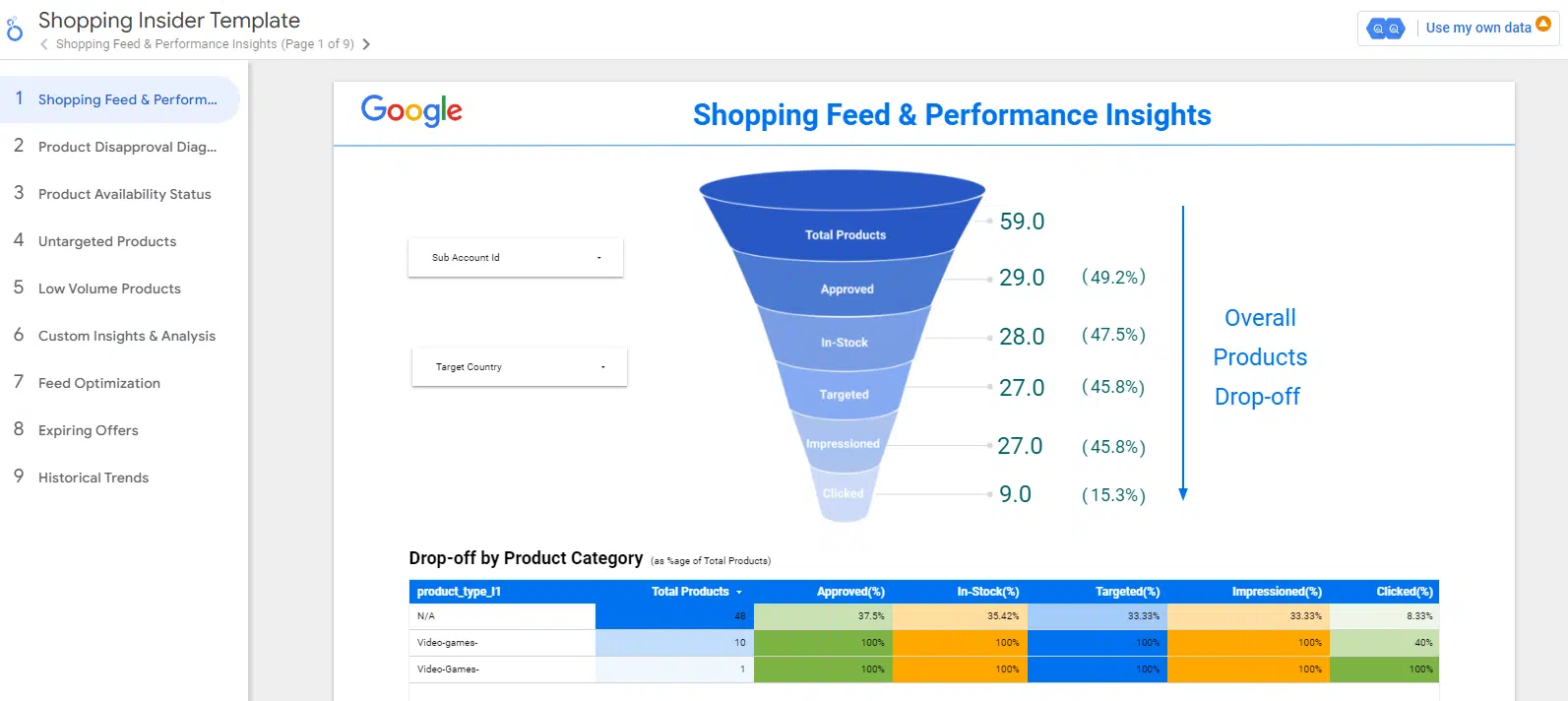
Shopping Insider
Shopping Insider is an innovative solution for retailers looking to improve their business through Google Merchant Center.
While not an officially supported Google product, it’s a powerful resource for making data-driven decisions to optimize shopping feed health and ad performance.
Designed specifically for Shopping Ads customers, Shopping Insider helps you:
Identify opportunities and problems at each stage of the buying funnel. Jump to global and detailed data analyses.
Shopping Insider’s value proposition is multifaceted.
It delivers richer insights by combining data to provide comprehensive performance information at the global and product level, focusing on custom attributes such as product type and brand. This level of detail allows for more detailed and specific information about the performance of shopping campaigns. It also includes an easy-to-use dashboard that makes it easy to share data and insights between multiple teams in a company. This collaborative approach is critical to addressing issues quickly and optimizing performance effectively.
From a technical standpoint, Shopping Insider’s solution architecture is robust and efficient. Export data daily from Google Merchant Center and Google Ads to a user’s Google Cloud project.
The insights generated are presented through a Looker Studio dashboard, providing a clear and actionable view of the data.
Formerly known as Shopping MarkUp, the tool has evolved into a vital asset for retailers looking to unlock the full potential of their Google Shopping campaigns.
MANGO
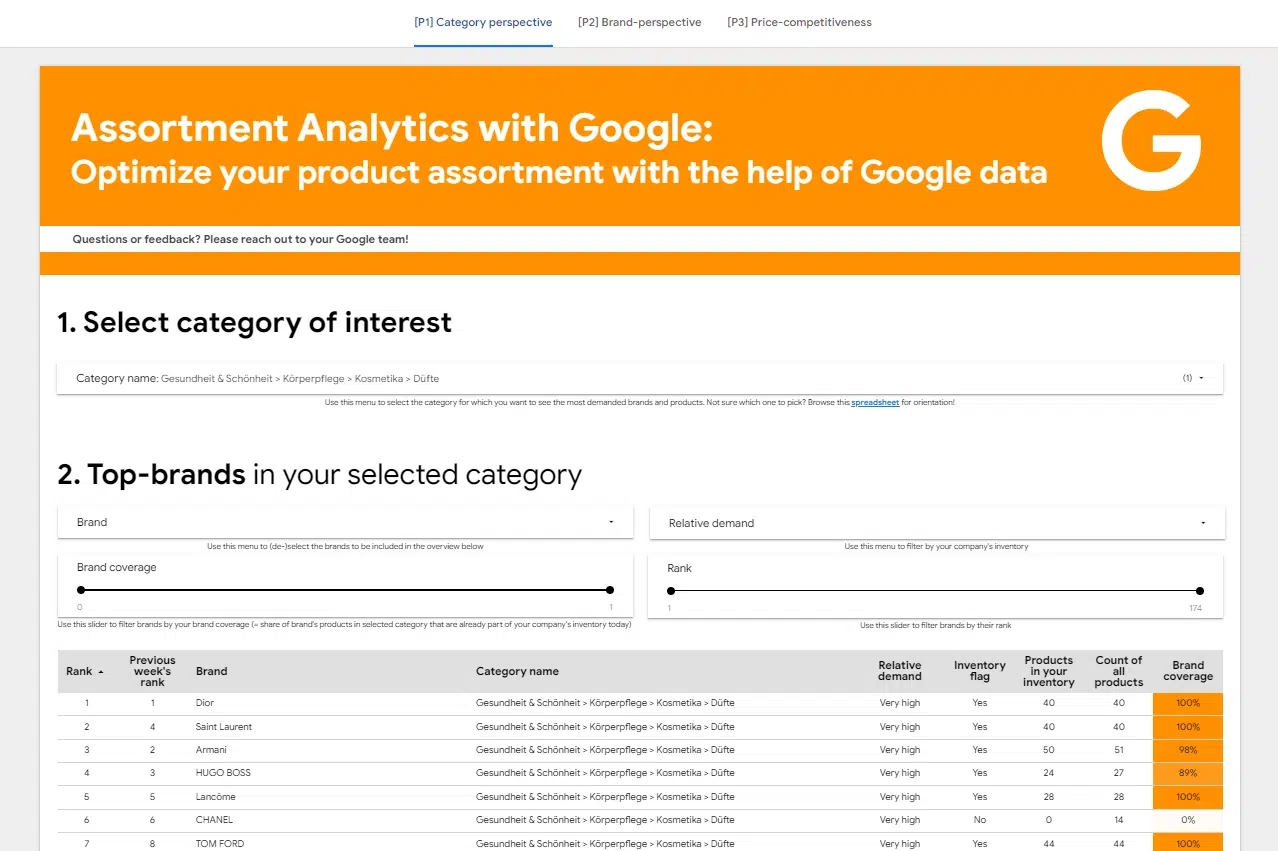
Merchant Center Assortment Analytics with Google (MANGO) is another open source solution for using Google’s Merchant Center to improve product assortment strategies.
This innovative tool is designed to optimize your product assortment by providing detailed information on three critical areas:
Product and brand popularity. Gaps in your product and brand coverage. Product price.
Product and brand popularity
This insight is crucial for retailers to understand consumer trends and preferences and decide which products to stock and promote.
By closely monitoring which items resonate with your audience, you can tailor your inventory to meet consumer demand, increasing sales potential and customer satisfaction.
Gaps in your product and brand coverage
With Assortment Analytics, you can identify areas where your inventory may be lacking, whether it’s a specific product type or a brand gaining traction in the market.
This is valuable in ensuring that your store offers a comprehensive selection that suits the different needs and wants of your customers.
Product price
Assortment Analytics helps you price products competitively by analyzing the price landscape.
Understanding how your product prices compare to market standards allows you to make more strategic pricing decisions, leading to better profit margins and competitive positioning.
Using Google Merchant Center data for business success
Google Merchant Center offers a treasure trove of free analytics that can give your online retail strategy an edge.
Whether it’s monitoring product performance in real-time, identifying gaps in your assortment, optimizing pricing, or driving automation with APIs, Merchant Center helps you make smart, data-driven decisions.
With BigQuery’s analytics capabilities or scripts for workflow automation, you have the tools to turn raw data into business results.
The views expressed in this article are those of the guest author and not necessarily Search Engine Land. Staff authors are listed here.
[ad_2]
Source link





